The Muscles of the Machine: Tools, MCP, and CLI From First Principles for Marketing and Ad-Tech
What separates a modern AI agent from a chatbot is its ability to do things in the world: pull data from a warehouse, fire a bid adjustment, publish a social post, query an analytics API, send an email.
These actions are performed by tools. The two main delivery models are the Model Context Protocol (MCP) and the CLI-first approach.
We will cover what tools are, how MCP and CLI expose them, what can go wrong, and how to wire them into practical marketing agents.
Content
Foundations
Part I: MCP From First Principles
- What MCP Actually Is
- Architecture: Hosts, Clients, Servers
- The Three Primitives
- Why MCP Exists: The N×M Problem
- MCP in Practice: A Marketing Example
Part II: CLI From First Principles
- What CLI Means in Agentic Systems
- The Unix Philosophy and Why It Matters Now
- CLI in Practice: A Marketing Example
- The Steinberger Thesis: Why OpenClaw Prefers CLI instead of MCP
Part III: The Dangers
- Context Rot: A Common Failure Mode
- Security Risks in MCP Integrations
- Over-Tooling: When More Is Less
- Prompt Injection Meets Tool Access
Part IV: Choosing the Delivery Model
- MCP vs CLI: The Trade-Off Matrix
- When MCP Wins
- When CLI Wins
- The Hybrid Approach
- Case Study: Google Workspace CLI - The Hybrid in the Wild
Part V: Building Your Tool Layer
- Your First MCP Server (Step by Step)
- Your First CLI Tool (Step by Step)
- Wiring Tools to Agents
- From Skills to Agents: The Practical Bridge
- The Marketing Tool Stack
Conclusion: Tools Are Decisions
What Is a “Tool” in the Agentic World?
Strip away all the jargon and a tool is the simplest thing in the entire agent stack: a capability the agent can invoke to do something it cannot do with language alone.
An LLM, on its own, can reason. It can plan. It can write. But it cannot check your Google Analytics traffic. It cannot adjust a bid in Google Ads. It cannot query your data warehouse. It cannot send a Slack message to your team.
A tool bridges that gap. It takes a request from the agent (“get me last week’s conversion data for the paid search channel”) and turns it into an action in the real world (a database query, an API call, a script execution) and then returns the result so the agent can keep reasoning.
Think of it this way. If skills are the habits your agent has learned - when to investigate anomalies, how to write a performance report, what counts as a meaningful pattern - then tools are the muscles those habits flex. Skills decide what to do. Tools do it.
A tool has a minimal contract:
A name. Something the agent can reference. Like get_campaign_metrics or adjust_bid or send_report.
A description. A plain-language explanation of what the tool does, so the model can decide when to use it. This is more important than most people realise as the quality of a tool’s description directly affects how well the agent chooses it.
A parameter schema. What inputs does the tool need? A channel name? A date range? An account ID? These are defined so the agent knows what to provide.
Deterministic behaviour. If you call the tool with the same inputs, it does the same thing. No surprises. No side effects you did not ask for.
That’s it. A tool is a name, a description, a set of parameters, and a predictable action. Everything else - MCP, CLI, function calling, API wrappers - is just how you package and deliver that contract to the agent.
The Anatomy of a Tool Call
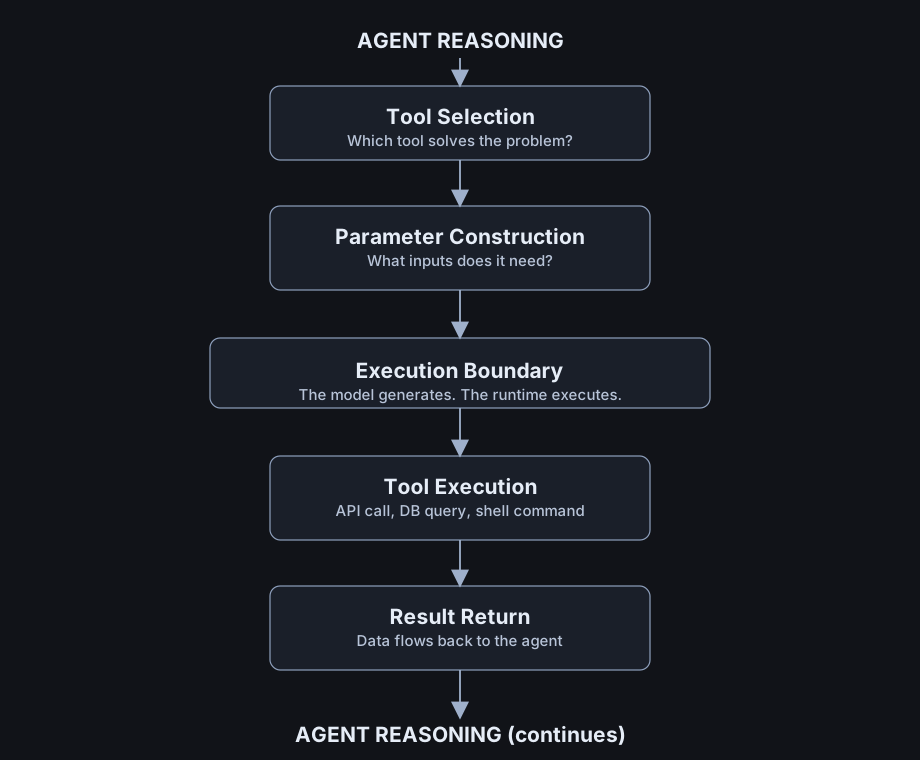
When an agent uses a tool, a specific sequence unfolds:
Step 1: The agent reasons. Based on its instructions, context, and the user’s request, the model decides it needs external information or needs to take an action it cannot accomplish with language alone.
Step 2: The agent selects a tool. It reviews the tools available to it - their names, descriptions, and parameters - and picks the one that matches its need. If you have given it a tool called get_campaign_metrics with a description that says “Returns impressions, clicks, and conversions for a given ad channel and date range,” the agent can recognise when this tool is appropriate.
Step 3: The agent constructs the call. It generates the parameters in the required format. For example: {"channel": "paid_search", "start_date": "2026-02-24", "end_date": "2026-03-02"}.
Step 4: The runtime executes the call. Something outside the model - the host application, the orchestrator, the runtime - actually runs the tool. The model does not execute anything directly. It generates a request. The runtime fulfils it.
Step 5: The result returns to the model. The tool’s output is injected back into the model’s context. Now the agent can reason about the data: “Paid search conversions dropped 18% week-over-week. Let me investigate why.”
Step 6: The agent continues. It might use another tool, ask a follow-up question, or synthesise a report.
This loop - reason, select, call, receive, reason again - is the fundamental cycle of agentic work. And the entire debate about MCP versus CLI versus raw function calling is really about how Steps 2 through 5 are implemented.
Why Tools Matter for Marketing
Tools determine what your agent can actually do. An agent with access to your analytics warehouse, your ad platform APIs, your CMS, and your email system can be a genuine marketing co-worker. An agent with no tools is a very articulate intern who cannot access any of your systems.
Tools determine what can go wrong. Give an agent a tool that can read your campaign data? Low risk. Give it a tool that can change your bids, pause your campaigns, or send your emails? The risk profile changes completely. The tool layer is where safety meets capability.
Tools determine your cost and speed. Every piece of data a tool returns lands in the agent’s context window. Return too much data, and you burn tokens, slow down responses, and - as we will see - risk a phenomenon called context rot where the agent literally gets dumber because it is drowning in information.
Tools determine your architecture. The choice between MCP and CLI is a practical engineering decision about how your agents connect to marketing infrastructure.
With that foundation laid, let us look at the two dominant approaches to packaging and delivering tools to agents.
Part I: MCP From First Principles
What MCP Actually Is
The Model Context Protocol is an open standard, introduced by Anthropic in November 2024, that defines a universal way for AI applications to connect to external tools and data sources.
Anthropic often uses a USB-C analogy: one connector standard replacing many proprietary connectors.
MCP tries to do the same thing for AI agents. Before MCP, if you wanted your agent to connect to Google Analytics, you wrote a custom integration. If you wanted it to connect to your data warehouse, you wrote another custom integration. If you wanted it to connect to Slack, another one. Every combination of “agent” and “data source” required bespoke code.
This creates what engineers call the N×M problem: N agents times M data sources equals N×M custom integrations. If you have 3 agents and 8 data sources, that is potentially 24 separate connectors to build and maintain.
MCP replaces this with a standard interface. Build an MCP server for each data source (M servers). Build MCP support into each agent (N clients). Now every agent can talk to every data source through the same protocol. Instead of N×M integrations, you have N+M.
That is the theory. The practice, as we will see, is more nuanced.
Architecture: Hosts, Clients, Servers
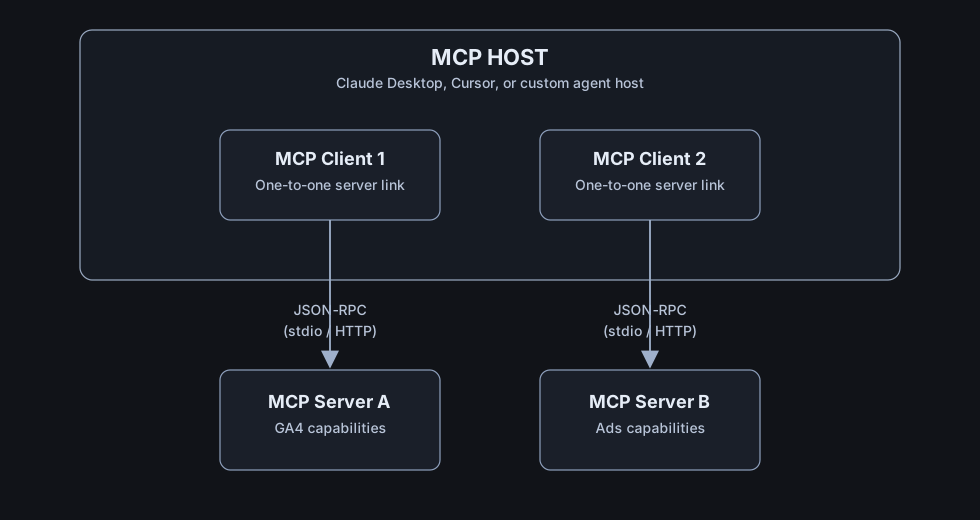
MCP has three components, and understanding how they relate is essential:
The MCP Host is the AI application the user interacts with. Claude Desktop, Cursor, a custom agent you have built - these are hosts. The host is where the model lives and where conversations happen.
The MCP Client is a piece of software inside the host that manages connections to MCP servers. Think of it as the USB-C port on your laptop. You might have multiple ports (multiple clients) connecting to multiple peripherals (multiple servers). Each client maintains a one-to-one connection with one server.
The MCP Server is the service that exposes capabilities to agents. Your marketing analytics server. Your ad platform server. Your CMS server. Each server declares what it can do, and the client connects to it.
The communication happens over a transport layer - typically either stdio (standard input/output, where the host launches the server as a process and they talk through the terminal’s input/output streams) or HTTP (where the server runs as a web service).
For local development and single-user setups, stdio is simpler: the host just starts the server process and pipes messages back and forth. For production deployments where multiple agents or users need to connect, HTTP is more appropriate.
Under the hood, they speak JSON-RPC 2.0 - a lightweight remote procedure call protocol. The client sends a JSON message saying “call this tool with these parameters,” and the server sends back a JSON response with the result.
MCP Primitives + Skill Layer
In this architecture, an MCP server exposes two primitives, and the runtime skill layer sits above them:
1. Tools - Executable functions
These are actions the agent can take. A tool named get_campaign_metrics that queries your analytics platform. A tool named create_audience_segment that builds an audience in your ad platform. A tool named send_slack_notification that pings your team.
Tools are the most commonly used primitive. They are what people usually mean when they say “MCP.”
Each tool has a name, a description (in natural language, so the model knows when to use it), and a JSON schema defining its parameters.
2. Resources - Structured data the agent can read
Resources are read-only data sources. Think of them as files or documents the agent can access: a configuration file, a dataset, documentation. Resources do not do anything they just provide information.
For marketing, a resource might be your brand guidelines document, your campaign naming conventions, or a reference dataset of historical benchmarks.
3. Skills - Reusable instruction layer (outside the MCP server surface)
Skills are reusable instruction assets loaded by the host runtime (for example via SKILL.md). A skill such as weekly_performance_report can orchestrate MCP tools/resources and standardise how the agent analyses and presents marketing data.
Skills are not an MCP server primitive in this model; they are the decision layer that sits on top of MCP.
Taken together: MCP provides a typed switchboard for external capabilities (tools/resources), while skills provide the reasoning and orchestration logic for using those capabilities.
Why MCP Exists: The N×M Problem
The practical motivation for MCP is straightforward. Consider a typical marketing team’s tool landscape:
- Google Analytics 4
- Google Ads
- Meta Ads Manager
- Your email platform
- Your CMS (WordPress, Contentful, etc.)
- Your data warehouse (BigQuery, Snowflake)
- Slack for team communication
- Your project management tool (Asana, Monday)
That is eight data sources. If you are building agents with three different hosts (say Claude Desktop for daily work, a custom orchestrator for automated workflows, and a reporting agent for stakeholders), you would need up to 24 custom integrations without a standard protocol.
With MCP, you build 8 servers (one per data source) and 3 clients (one per host). Eleven components instead of twenty-four. And every new agent you add only requires one new client, not eight new integrations.
This helps explain rapid adoption: Anthropic introduced MCP in late 2024, OpenAI and Google adopted MCP support across parts of their stacks in 2025, Microsoft added MCP support in its Windows agent tooling, and by December 2025 Anthropic donated MCP to the Linux Foundation via the Agentic AI Foundation.
But adoption does not mean the architecture is without problems. Significant ones, as we will see.
MCP in Practice: A Marketing Example
Here is what a simple MCP server looks like for marketing analytics, using the Python FastMCP framework:
from mcp.server.fastmcp import FastMCP

mcp = FastMCP(name="Marketing Analytics Server")

@mcp.tool()
def get_campaign_metrics(channel: str, start_date: str, end_date: str) -> dict:
    """
    Return KPIs (impressions, clicks, conversions, spend, ROAS)
    for a given marketing channel and date range.
    Dates should be ISO format (YYYY-MM-DD).
    """
    # In production, this queries your data warehouse.
    # For illustration, returning structured data.
    return {
        "channel": channel,
        "start_date": start_date,
        "end_date": end_date,
        "impressions": 1_240_000,
        "clicks": 45_600,
        "conversions": 1_230,
        "spend": 28_400.00,
        "roas": 3.42
    }

@mcp.tool()
def get_anomalies(channel: str, metric: str, lookback_days: int = 7) -> dict:
    """
    Detect statistically significant anomalies in a marketing metric.
    Returns any deviations beyond 2 standard deviations from the rolling mean.
    """
    return {
        "channel": channel,
        "metric": metric,
        "anomalies": [
            {"date": "2026-03-03", "value": 890, "expected": 1230,
             "deviation": -2.4, "direction": "drop"}
        ]
    }

@mcp.resource("config://channel-benchmarks")
def get_benchmarks() -> str:
    """Baseline performance benchmarks by channel for comparison."""
    return """
    paid_search: CTR 3.2%, CVR 2.8%, CPA $23
    paid_social: CTR 1.8%, CVR 1.2%, CPA $41
    email: CTR 22%, CVR 4.1%, CPA $8
    """

# Skill note:
# In practice, keep this in SKILL.md (or your runtime's skill registry)
# and have the agent call MCP tools from that skill workflow.

if __name__ == "__main__":
    mcp.run(transport="stdio")
When this server starts, it tells the host: “I have two tools (get_campaign_metrics and get_anomalies) and one resource (channel-benchmarks). Skill instructions (for example weekly_performance_summary) are loaded from your skill layer (for example SKILL.md).”
The agent can then use these capabilities naturally in conversation:
“What happened with our paid search performance last week?”
The agent recognises this requires data, selects the get_campaign_metrics tool, constructs the call with channel="paid_search" and the appropriate dates, receives the result, and reasons about it.
This pattern works well for stable, well-defined integrations.
But notice something: in many MCP hosts, server capability metadata (tool descriptions/schemas and resource descriptors) is made available to the model up front. Every declared capability can take up tokens in the model’s working memory, whether the agent needs it right now or not.
With one server and two tools, this is negligible. With fifteen servers and eighty tools, it becomes a serious problem. Hold that thought.
Part II: CLI From First Principles
What CLI Means in Agentic Systems
A CLI - command-line interface - is the oldest and most universal way humans interact with computers through text. You type a command. The computer does something. It prints a result.
$ curl -s api.weather.com/london | jq '.temperature'
12.4
That is a tool call. A human-readable, composable, reproducible, debuggable tool call that has worked since the 1970s.
In the agentic world, CLI-first means this: instead of wrapping every capability in a protocol server with JSON schemas and typed primitives, you give the agent access to a shell and let it run commands.
The agent does not call a get_campaign_metrics MCP tool. It runs:
marketing report --channel paid_search --since 2026-02-24 --until 2026-03-02 --jsonIt reads the output. It reasons. It runs the next command.
No protocol. No server. No JSON-RPC. The operating system is your runtime and the shell is your tool bus.
The Unix Philosophy and Why It Matters Now
The CLI-first approach is not a regression. It is the application of a fifty-year-old engineering philosophy that turns out to be remarkably well-suited to agentic systems.
The Unix philosophy, articulated by Doug McIlroy in 1978, has a few core tenets:
Do one thing well. Each program should have a single, clear purpose.
Expect output to become input. Programs should produce output that can be fed into other programs. This is the pipe (|) - the most powerful operator in computing.
Text is the universal interface. Programs communicate through text streams. You do not need a shared schema, a protocol buffer, or a type system. You need readable text.
These principles map almost perfectly onto what agents need:
- Agents work best with tools that do one thing clearly (not a single MCP server with forty overlapping capabilities).
- Agents need to chain operations (get data → filter → analyse → format → send), and pipes do this naturally.
- LLMs are made of text. A CLI tool that produces readable text output is literally speaking the agent’s native language.
Here is why this matters for the MCP debate. When an MCP server returns data, it returns a structured JSON blob. The entire blob goes into the agent’s context. If you asked for the weather in London and the server returns temperature, humidity, wind speed, atmospheric pressure, UV index, pollen count, and a five-day forecast, all of that goes into the context window even if you only needed to know whether it was raining.
With CLI, the agent can filter:
marketing report --channel paid_search --since 2026-02-24 --json | jq '.conversions, .roas'Only the fields the agent actually needs enter the context. Everything else is discarded at the shell level, before it ever reaches the model.
This is a fundamental architectural difference in how context is managed.
CLI in Practice: A Marketing Example
Here is what a CLI-first marketing tool looks like:
# Get high-level KPIs for paid search
$ marketing report --channel paid_search --since 2026-02-24 --json
{
  "channel": "paid_search",
  "impressions": 1240000,
  "clicks": 45600,
  "conversions": 1230,
  "spend": 28400.00,
  "roas": 3.42
}

# Just get ROAS for all channels in one line
$ for ch in paid_search paid_social email organic; do
    marketing report --channel $ch --since 2026-02-24 --json | jq -r "\"$ch: \" + (.roas | tostring)"
  done
paid_search: 3.42
paid_social: 2.18
email: 8.91
organic: null

# Find channels where conversions dropped more than 10%
$ marketing compare --since 2026-02-24 --vs-previous-week --json \
    | jq '.[] | select(.conversion_change_pct < -10)'
{
  "channel": "paid_social",
  "conversion_change_pct": -14.2,
  "conversions_current": 890,
  "conversions_previous": 1037
}

# Chain it: find anomalies, then get details, then format for Slack
$ marketing anomalies --lookback 7 --json \
    | jq '.[] | .channel' \
    | xargs -I{} marketing report --channel {} --since 2026-02-24 --json \
    | marketing format --for slack
Notice what is happening. Each command does one thing. They compose through pipes. The agent can filter and transform data before it enters the context window. And every command is readable - you could copy any of these into a terminal and run them yourself.
OpenClaw’s CLI Bias in Practice
OpenClaw is useful here because it shows a concrete CLI-first design, not just an opinion.
Its argument for CLI defaults comes down to four operational points:
1. Less context overhead. MCP servers export capability metadata up front. CLI tools can be called on demand and filtered before results reach the model.
2. Better composability. CLI pipelines can combine retrieval, filtering, and formatting in one shell flow. MCP typically requires multiple separate calls.
3. Easier debugging. CLI failures surface as commands, exit codes, and stderr. That is usually easier to reproduce than protocol-level errors.
4. Lower integration overhead. If a reliable CLI already exists, adding an MCP layer may not improve the workflow enough to justify the extra system.
This does not make MCP obsolete. It means protocol choice should follow the integration need. For many marketing teams, the practical default is:
- use MCP for shared, stateful, cross-host integrations
- use CLI for internal scripts, data transforms, and fast iteration
Part III: The Dangers
Context Rot: A Common Failure Mode
Context rot is what happens when an agent’s context window gets so cluttered with tool outputs, schema descriptions, historical data, and accumulated noise that the model’s reasoning quality measurably degrades.
LLMs have a finite attention budget. Every token in the context window competes for that attention. When the window is full of unnecessary tool descriptions, stale API responses, and schema boilerplate, signal-to-noise drops and model quality degrades.
For marketing agents, context rot shows up in a few common ways:
The slow drift. Early in a session, the agent identifies anomalies and makes precise recommendations. After repeated tool calls, it starts repeating summaries, missing patterns, and producing more generic suggestions.
The schema fog. You connect the agent to many MCP servers. Before it has done any work, the context window already contains hundreds of tool descriptions, parameter schemas, and documentation strings.
The data deluge. An analytics server returns full campaign breakdowns when the agent only needed one metric. A CRM server returns complete contact records when the agent only needed an email address. Each broad response consumes context budget.
The compounding problem. In a multi-step workflow - pull data, analyze, compare to benchmarks, generate report - each step adds more context. By the final step, the agent is still carrying earlier tool responses it may no longer need.
The mitigations for context rot are architectural:
Return only what is needed. Design tools (MCP or CLI) to return the minimum useful data. If the agent asks for ROAS, do not return every metric in your warehouse.
Use progressive disclosure. Do not load all tools at startup. Load them when needed. CLI has a structural advantage here: tools are invoked on demand, and schemas are consulted only when needed.
Compact aggressively. After an agent has processed a tool result and extracted what it needs, the result can be summarised or removed from the active context. Some agent frameworks do this automatically.
Filter before ingestion. With CLI, pipe output through filters before it reaches the model. With MCP, add post-processing layers that strip responses down to the relevant data before they enter context.
Context rot is not a reason to avoid tools. It is a reason to be deliberate about tool exposure, response size, and context management over the life of an agent session.
Security Risks in MCP Integrations
MCP’s design favors interoperability and adoption speed, which means security controls must be added deliberately at implementation time.
This is not an abstract concern. In April 2025, security researchers published an analysis identifying multiple attack vectors opened up by MCP:
Tool poisoning. An MCP server can contain malicious descriptions - tool descriptions that look innocent to the user but contain instructions designed to manipulate the model’s behaviour. Since the model reads tool descriptions as part of its context, a poisoned description can influence the agent’s reasoning without the user ever seeing it.
Silent definition mutation. An MCP server can change its tool definitions after initial registration. A tool that was safe when you connected it can quietly modify its behaviour changing parameters, altering descriptions, or adding new capabilities the user did not authorise.
Cross-server tool shadowing. When multiple MCP servers are connected, a malicious server can register tools with the same names as trusted servers, intercepting calls meant for legitimate tools.
Data exfiltration via tool chains. A compromised tool can read data from one MCP call and send it to an external endpoint in a subsequent call. Cisco’s AI security team demonstrated this with a third-party OpenClaw skill that performed data exfiltration and prompt injection without user awareness.
For marketing systems specifically, these risks are acute because marketing tools typically have access to:
- Customer data (PII, purchase history, behavioral signals)
- Financial data (budgets, spend, revenue)
- Brand communications (email content, ad copy, social posts)
- Platform credentials (API keys for ad platforms, analytics, CRM)
The mitigations are straightforward but require discipline:
Least privilege. Every tool should have the minimum permissions necessary. A reporting tool should read data, not write it. A bid adjustment tool should adjust bids within bounds, not have unrestricted API access.
Separate read and write. Make distinct tools for “get data” and “change something.” This lets you gate write operations with additional confirmation steps.
Audit everything. Log every tool call- inputs, outputs, timing, user context. This is required for tools that touch customer data or campaign budgets.
Vet your servers. Do not connect MCP servers you have not reviewed. The MCP ecosystem is growing fast, and not every server has been built with security in mind.
Default-off for dangerous operations. Destructive operations (pausing campaigns, changing budgets, sending emails) should require explicit human confirmation.
Over-Tooling: When More Is Less
There is a strong temptation, once you understand tools, to give your agent access to everything. Connect every API. Expose every capability. The more tools, the more powerful the agent, right?
Over-tooling is a common failure mode in agent design, and it manifests in several ways:
Tool confusion. When an agent has access to forty tools with overlapping capabilities, it frequently selects the wrong one. If you have both get_campaign_performance and get_channel_metrics and fetch_marketing_data, the model has to guess which one you meant. Ambiguity leads to errors.
Context bloat. As discussed above, every tool’s description and schema consumes context tokens. Forty tools with detailed descriptions can consume thousands of tokens before the agent has done any work.
Decision paralysis. Models, like humans, make worse decisions when presented with too many options. A focused set of five well-designed tools consistently outperforms a sprawling set of fifty.
Maintenance burden. Every tool is a dependency. Every dependency can break, change, or become a security liability. Fifteen tools means fifteen things that can fail at 2am when your automated reporting agent is trying to run.
The principle is simple: least tools, not most tools. Start with the minimum set that lets your agent accomplish its job. Add tools only when you have a specific, validated need. Remove tools that are not being used.
For a marketing performance agent, the minimum viable tool set might be:
get_metrics- Pull KPIs for a channel and date rangeget_anomalies- Detect statistical outliersget_benchmarks- Compare against historical baselinesformat_report- Structure output for a specific audience
A focused four-tool set is often more effective than a broad overlapping tool set.
Prompt Injection Meets Tool Access
Prompt injection - where external text manipulates an agent’s behaviour - becomes more dangerous when the agent has tool access.
Without tools, a prompt injection may cause incorrect output, but impact is limited.
With tools, a prompt injection can cause the agent to do something wrong: query a database with a malicious parameter, send a message to the wrong recipient, exfiltrate data to an external endpoint, or modify a campaign in an unintended way.
The attack surface expands with the number and power of available tools. Least privilege is therefore a primary defense against prompt injection in agentic systems.
If your agent processes user-generated content (ad copy, social posts, web content, email text) and has access to tools that can modify campaigns or send communications, you must assume that some of that content will attempt prompt injection. Design your tool layer accordingly: gate sensitive operations, validate parameters, and never execute instructions read from external content without verification.
Part IV: Making the Choice
MCP vs CLI: The Trade-Off Matrix
| Aspect | MCP | CLI |
|---|---|---|
| Interface | JSON-RPC with typed primitives | Shell commands with text I/O |
| Setup complexity | Build and maintain servers per integration | Write scripts or use existing CLIs |
| Ecosystem | Growing fast - thousands of shared servers | Enormous - every Unix tool ever built |
| Context efficiency | Lower (tool descriptions load at startup) | Higher (tools invoked on demand, output filterable) |
| Composability | Individual calls, hard to chain | Natural piping and scripting |
| Transparency | Server logic can be opaque | Commands fully visible and reproducible |
| Governance | Typed schemas, permissioned access | Depends on your shell security model |
| Cross-platform reuse | Strong - one server serves many hosts | Depends on host shell access |
| Debugging | JSON-RPC logs, protocol-level errors | Shell errors, exit codes, stderr |
| Best for | Stateful APIs, cross-app standardisation, enterprise governance | Simple integrations, scripting, auditability, fast iteration |
Neither approach is universally better. The right choice depends on your specific constraints.
When MCP Wins
MCP is the stronger choice when:
You need cross-platform reuse. If the same integration needs to work across Claude Desktop, Cursor, a custom orchestrator, and a reporting bot, MCP’s standardised protocol means you build once and connect everywhere. A CLI tool works in a shell; an MCP server works in any MCP-compatible host.
You need enterprise governance. MCP servers can be sandboxed, permissioned, and audited as discrete services. In regulated industries or large organisations where security review is mandatory for every integration, the explicit schema and typed interface make compliance easier.
You are integrating complex, stateful APIs. Some APIs require authentication flows, session management, webhook handling, and bidirectional communication. Wrapping these in a CLI becomes cumbersome; MCP’s server model handles stateful interactions more naturally.
You want a shared ecosystem. If an MCP server already exists for your data source (and thousands now do), you can connect to it without writing any integration code. The plug-and-play ecosystem is MCP’s strongest practical advantage.
Your agents do not have shell access. Some deployment environments - particularly cloud-hosted agents, browser-based applications, and mobile contexts - do not have a Unix shell available. In these environments, MCP (over HTTP) is the natural connectivity layer.
When CLI Wins
CLI is the stronger choice when:
Context efficiency is critical. If your agent works within tight context limits (common in production environments where cost per token matters), CLI’s ability to filter and compose before ingestion is a material advantage.
You are iterating quickly. Building an MCP server requires server code, schemas, transport handling, and integration testing. A CLI tool can often start as a script with structured output, giving a shorter feedback loop.
You need composability. If your workflows involve multi-step data transformations - “get all campaigns, filter by ROAS below 2, compare to last month, format for the CMO” - CLI’s piping model handles this natively. MCP requires the agent to make multiple separate calls and carry all the intermediate data in context.
Transparency and auditability matter. When your CEO asks “what did the AI do to our campaigns last night?” you want an answer that is easy to trace. Shell history is your audit trail. Every command the agent ran is visible, reproducible, and debuggable.
The tools already exist. Google Cloud has a CLI. AWS has a CLI. Most databases have CLIs. Most data platforms have CLIs. If the tool you need already exists as a command-line program, wrapping it in MCP is adding complexity, not reducing it.
Your agent runs in a shell-accessible environment. If your agent runs on a server, a VM, a container, or your laptop - anywhere with a Unix shell - CLI tools are immediately available with no additional infrastructure.
The Hybrid Approach
In practice, most mature agent architectures will use both.
Use MCP for stable, widely-shared integrations where the ecosystem advantage matters - your CRM, your project management tool, your cloud platform services. These benefit from the standardised interface and the existing server ecosystem.
Use CLI for fast, purpose-built tools specific to your marketing workflow - custom analytics queries, proprietary reporting formats, internal data transformations, campaign management scripts. These benefit from the speed of development, composability, and context efficiency.
Keep the tool surface small regardless of approach. Whether your tools are MCP servers or CLI programs, the principles are the same: least privilege, least tools, maximum clarity, minimum context pollution.
Steinberger himself follows this hybrid model. Despite his vocal preference for CLI, he still uses MCP where it makes sense. His argument is not “never use MCP” - it is “default to CLI, and use MCP only when the overhead is justified by the specific integration’s needs.”
For a marketing team, a practical split might be:
- MCP: Google Analytics integration (complex OAuth, widely shared across team agents), CRM integration (stateful, complex API), email platform (existing server available)
- CLI: Custom campaign reporting scripts, internal benchmarking tools, data warehouse queries, audience export utilities, anomaly detection scripts
Case Study: Google Workspace CLI - The Hybrid in the Wild
The ideas in this guide - CLI-first design, MCP as an option rather than a default, skills as the reasoning layer, and deliberate context management - come together in one useful example: the Google Workspace CLI (gws).
This is Google’s command-line tool for Drive, Gmail, Calendar, Sheets, Docs, Chat, and Admin. It supports both human and agent workflows and is a useful example of hybrid architecture.
CLI-first, MCP-optional. The primary interface is a standard Unix CLI. You type gws drive files list --params '{"pageSize": 10}' and you get structured JSON back. You can pipe, filter, compose:
# Stream paginated results and extract file names
gws drive files list --params '{"pageSize": 100}' --page-all | jq -r '.files[].name'

# Create a spreadsheet in one command
gws sheets spreadsheets create --json '{"properties": {"title": "Q1 Budget"}}'

# Preview a request without executing it
gws chat spaces messages create \
  --params '{"parent": "spaces/xyz"}' \
  --json '{"text": "Deploy complete."}' \
  --dry-run
This is solid CLI design: structured output, composability through pipes, --dry-run for safety, and --json for agent consumption. An agent working with gws gets filtered data before it enters the context window.
MCP is also available when needed. Running gws mcp -s drive,gmail,calendar starts an MCP server over stdio, exposing Google Workspace APIs as typed tools that MCP-compatible hosts - Claude Desktop, Cursor, VS Code - can call directly. The same engine serves both interfaces.
This is the hybrid approach in practice: CLI for fast iteration, composability, and context efficiency. MCP for cross-platform reuse and environments where agents cannot access a shell.
The documentation also reflects the context-management tradeoff. Each Workspace service adds roughly 10 to 80 tools to the MCP surface, and Google explicitly recommends limiting the list to what you need to stay under client tool limits.
Agent skills ship alongside the tools. The repo includes SKILL.md files - one for each supported API plus higher-level workflow helpers and curated recipes for common Gmail, Drive, Docs, Calendar, and Sheets tasks. These skills are compatible with OpenClaw (symlink into ~/.openclaw/skills/) and other skill-based frameworks. This reflects the same three-layer model described in this guide: tools provide capability, skills provide reasoning, and the agent orchestrates both.
Security is built into the tool layer. The gws CLI integrates with Google Cloud Model Armor for response sanitization - scanning API responses for prompt injection before they reach the agent. You enable it with a flag:
gws gmail users messages get --params '...' \
  --sanitize "projects/P/locations/L/templates/T"
This addresses the prompt injection risk discussed in Part III. When the agent reads emails or documents through the CLI, hostile content can attempt to manipulate behavior. Model Armor intercepts that content at the tool boundary.
The dynamic discovery model reduces maintenance. Rather than shipping a static list of commands, gws reads Google’s Discovery Service at runtime and builds its command surface dynamically. When Google adds an API endpoint, the CLI can pick it up without manual updates.
Why this matters for marketing teams. Google Workspace is where campaign briefs live (Docs), media plans are built (Sheets), meetings run (Calendar), approvals flow (Gmail), assets are stored (Drive), and teams coordinate (Chat). An agent that can interact with these surfaces through one tool layer - CLI for daily workflows and MCP for cross-platform deployments - covers a large part of non-ad-platform marketing operations.
The gws project is still pre-1.0 and includes an explicit disclaimer that it is not an officially supported Google product. Architecturally, it is still a strong real-world example of a CLI-first, MCP-optional, skills-integrated approach.
Part V: Building Your Tool Layer
Your First MCP Server (Step by Step)
Here is the minimum viable path to a working MCP server for marketing analytics:
Step 1: Set up the project
mkdir marketing-mcp
cd marketing-mcp
python -m venv .venv
source .venv/bin/activate
pip install "mcp[cli]" httpx
Step 2: Write the server
Create server.py:
from mcp.server.fastmcp import FastMCP

mcp = FastMCP(name="Marketing Analytics Server")

@mcp.tool()
def get_kpis(channel: str, start_date: str, end_date: str) -> dict:
    """
    Return basic KPIs (impressions, clicks, conversions, spend, ROAS)
    for a marketing channel and date range.
    Dates are ISO strings (YYYY-MM-DD).
    """
    # Replace with real data source in production
    return {
        "channel": channel,
        "period": f"{start_date} to {end_date}",
        "impressions": 1_240_000,
        "clicks": 45_600,
        "conversions": 1_230,
        "spend": 28_400.00,
        "roas": 3.42
    }

if __name__ == "__main__":
    mcp.run(transport="stdio")
Step 3: Register with your host
Add to your Claude Desktop or Cursor config:
{
  "mcpServers": {
    "marketing-analytics": {
      "command": "python",
      "args": ["/path/to/marketing-mcp/server.py"]
    }
  }
}
Step 4: Test
Create a test_client.py:
import asyncio
from pathlib import Path
from mcp import ClientSession, StdioServerParameters
from mcp.client.stdio import stdio_client

async def main():
    server = Path(__file__).with_name("server.py")
    params = StdioServerParameters(command="python", args=[str(server)])

    async with stdio_client(params) as (read, write):
        async with ClientSession(read, write) as session:
            await session.initialize()

            tools = await session.list_tools()
            print("Available tools:", [t.name for t in tools.tools])

            result = await session.call_tool(
                "get_kpis",
                arguments={
                    "channel": "paid_search",
                    "start_date": "2026-02-24",
                    "end_date": "2026-03-02"
                }
            )
            print("Result:", result.content)

asyncio.run(main())
Run python test_client.py. If you see the tool list and the KPI data, your server works.
Step 5: Evolve
Replace the dummy data with real API calls to your analytics platform. Add error handling. Add authentication. Add more tools as needed - but remember: add tools only when you have a specific need, not “just in case.”
Your First CLI Tool (Step by Step)
Here is the CLI equivalent:
Step 1: Create the script
Create marketing-cli.py:
#!/usr/bin/env python3
"""Marketing analytics CLI - query KPIs from the command line."""

import argparse
import json
import sys

def get_kpis(channel, start_date, end_date):
    """Fetch KPIs. Replace with real data source in production."""
    return {
        "channel": channel,
        "period": f"{start_date} to {end_date}",
        "impressions": 1_240_000,
        "clicks": 45_600,
        "conversions": 1_230,
        "spend": 28_400.00,
        "roas": 3.42
    }

def main():
    parser = argparse.ArgumentParser(description="Marketing analytics CLI")
    subparsers = parser.add_subparsers(dest="command")

    report = subparsers.add_parser("report", help="Get channel KPIs")
    report.add_argument("--channel", required=True, help="Marketing channel")
    report.add_argument("--since", required=True, help="Start date (YYYY-MM-DD)")
    report.add_argument("--until", required=True, help="End date (YYYY-MM-DD)")
    report.add_argument("--json", action="store_true", help="Output as JSON")

    args = parser.parse_args()

    if args.command == "report":
        data = get_kpis(args.channel, args.since, getattr(args, 'until'))
        if args.json:
            print(json.dumps(data, indent=2))
        else:
            print(f"Channel: {data['channel']}")
            print(f"Period:  {data['period']}")
            print(f"Impressions: {data['impressions']:,}")
            print(f"Clicks:      {data['clicks']:,}")
            print(f"Conversions: {data['conversions']:,}")
            print(f"Spend:       ${data['spend']:,.2f}")
            print(f"ROAS:        {data['roas']:.2f}x")
    else:
        parser.print_help()
        sys.exit(1)

if __name__ == "__main__":
    main()
Step 2: Make it executable and put it on the path
chmod +x marketing-cli.py
sudo ln -s $(pwd)/marketing-cli.py /usr/local/bin/marketing
Step 3: Test it
# Human-readable
$ marketing report --channel paid_search --since 2026-02-24 --until 2026-03-02

# JSON for piping
$ marketing report --channel paid_search --since 2026-02-24 --until 2026-03-02 --json

# Filter with jq
$ marketing report --channel paid_search --since 2026-02-24 --until 2026-03-02 --json | jq '.roas'
Step 4: Teach your agent to use it
If you are using OpenClaw or a similar skill-based agent, create a skill file that tells the agent when and how to use this tool:
# marketing-cli skill

## When to use
Use when the user asks for marketing performance data, KPIs,
or channel reports.

## How to use
Run `marketing report --channel <channel> --since <date> --until <date> --json`
Parse the JSON output and summarise for the user.
Available channels: paid_search, paid_social, email, organic, display.

## Safety
This tool is read-only. It cannot modify campaigns.
Step 5: Evolve
Add subcommands: marketing anomalies, marketing compare, marketing benchmark. Add --format slack for pre-formatted Slack messages. Add --dry-run for any write operations. Follow the principle of one command, one purpose.
Wiring Tools to Agents
Regardless of whether you choose MCP, CLI, or a hybrid, the wiring pattern is the same:
1. Define the tool. What does it do? What inputs does it need? What does it return?
2. Describe it for the agent. Write a clear, concise description that helps the model decide when to use it. Poor descriptions lead to misuse.
3. Limit the surface. Expose only what the agent needs for its role. A performance analyst agent does not need campaign editing tools. A content agent does not need bid adjustment tools.
4. Gate dangerous operations. Any tool that can change state (modify campaigns, send communications, adjust budgets) should have an explicit confirmation step. The agent proposes the action. A human approves or rejects.
5. Log everything. Every tool call, every parameter, every result. This is your audit trail and your debugging toolbox.
6. Test with adversarial inputs. Before deploying, try to break your tools. What happens with empty inputs? Invalid dates? SQL injection attempts? Edge cases matter.
From Skills to Agents: The Practical Bridge
In practice, the stack looks like this:
- User asks for an outcome such as a weekly performance review.
- The agent selects the right skill.
- The skill calls tools through MCP, CLI, or both.
- The runtime executes those tool calls.
- The agent synthesizes the result and applies the skill’s guardrails.
This keeps the architecture grounded. Skills should not carry raw integrations. Agents should not improvise business logic from scratch. Tools should not contain the reasoning layer.
The Marketing Tool Stack
Here is a practical tool stack for a marketing agent workforce, organised by risk level:
Read-Only Tools (Low Risk)
- Campaign performance metrics (GA4, ad platform reporting APIs)
- Competitive intelligence (SEMrush, SimilarWeb data)
- Content performance (CMS analytics)
- Audience insights (DMP/CDP queries)
- Market benchmarks (industry reports, historical data)
Analytical Tools (Low-Medium Risk)
- Anomaly detection (statistical analysis on metric time series)
- Attribution analysis (cross-channel contribution)
- Forecast models (spend/return projections)
- Audience clustering (behavioral pattern discovery)
Communication Tools (Medium Risk)
- Slack/Teams notifications (status updates, alerts)
- Report formatting and distribution
- Email draft generation (drafts, not sends)
- Dashboard updates
Write Tools (High Risk - Require Human Approval)
- Campaign budget adjustments
- Bid modifications
- Audience segment creation/modification
- Ad creative changes
- Email sends
- Content publishing
Never-Automate Tools
- Account-level budget changes
- Platform credential management
- Payment method modifications
- User permission changes
The rule of thumb: if a mistake with this tool would cost more than an hour to fix, it requires human approval.
Conclusion: Tools Are Decisions
This article is the implementation layer for the previous two guides.
In Skills Playbook, the skill carried the reusable reasoning pattern. In the Agent Anatomy, the agent combined role, memory, skills, and orchestration. In this article, the tool layer makes those systems operational by connecting them to real data, real services, and real execution paths.
The central decision is how to expose the smallest, safest, most useful execution surface for the skill and agent you are building.
Use MCP when you need shared integrations, typed interfaces, and cross-host reuse. Use CLI when you need speed, composability, and shell-level control. Use both when the stack benefits from it.
The core rules stay the same:
Start small. Use the least number of tools that accomplish the job. Keep skills responsible for reasoning, tools responsible for execution, and agents responsible for orchestration. Return the minimum useful data. Gate dangerous actions. Log everything. Test failure modes early.
Further Reading:
- Anthropic, Effective Context Engineering for AI Agents (2025)
- MCP Official Documentation
- Linux Foundation, Agentic AI Foundation Announcement (December 2025)
- Luke Tucker, OpenClaw, KiloCode and Why CLI > MCP (2026)
- Peter Steinberger on Lex Fridman Podcast #491 (2026)
- Thoughtworks, The Model Context Protocol’s Impact on 2025
- MCP+: Precision Context Management for MCP Agents
- OWASP, LLM Excessive Agency Risk
- Google Workspace CLI (
gws) - GitHub Repository