The Agent Architect’s Playbook: Building AI Skills for Marketing & Ad Tech
A Practical Guide for Marketers and Engineers Who Want to Own the AI Stack
The Shift from User to Architect
AI isn’t just changing the tools you use, it’s rewriting the rules of professional defensibility. Products that once required teams of engineers and months of development can now be prototyped in days by small groups using AI agents, reusable “skills,” and shared infrastructure. Accounting, legal, customer support, and now marketing are being rebuilt around AI-first workflows.
The threat: If you stay at the surface level - prompting chatbots and clicking prepackaged AI features - you’re competing with everyone else who can click the same buttons. Commoditization is real, and it’s accelerating.
The opportunity: If you understand how modern AI products are engineered - how skills, tools, and agents are wired together - you can design your own automations, build internal co-pilots, and stitch together data and channels in ways off-the-shelf tools can’t.
This guide is designed to help you do exactly that. By the end, you won’t just brief engineering teams better - you’ll prototype your own AI-powered workflows, harden your role against commoditization, and actively shape the next generation of marketing tools instead.
Module 1: Deconstructing the AI Stack
Before building, you need to see how the pieces fit together. Modern AI systems for marketing and ad tech rest on three interconnected layers:
Tools: The Hands
Tools are concrete operations the model can invoke: “run SQL query,” “fetch Meta Ads metrics,” “send Slack alert,” or “call HTTP API.” They’re exposed via function schemas that tell the AI what parameters to expect.
Marketing example: A tool that queries your Google Ads API for campaign performance, or a tool that posts creative assets to your Meta Business Manager.
MCP: The Nervous System
The Model Context Protocol (MCP) is a standardized way to expose tools, data, and context via servers that any LLM client can call. Think of MCP servers as universal adapters that let AI agents interact with your marketing stack - your CRM, ad platforms, analytics warehouse, or internal APIs - without custom integration work for each new agent.
Key insight: MCP “opens what the model can operate on” (APIs, databases, services), creating a plug-and-play ecosystem where your marketing data becomes accessible to any AI agent that speaks the protocol.
Skills: The Brain
Skills are reusable, structured behaviors that teach an LLM how to perform a task or workflow - often across multiple tools. They’re packaged so agents can discover, load, and execute them rather than being baked into a single prompt.
The crucial distinction:
- MCP servers expose capabilities (what the AI can do)
- Skills encode behavior (how the AI should do it)
A skill might orchestrate five different MCP tools to run a weekly performance review, applying your team’s specific SOPs, guardrails, and formatting preferences along the way.
How They Work Together
User Request: "How did our Q4 campaigns perform?"
    ↓
AI Agent parses intent
    ↓
Discovers "Weekly Performance Review" SKILL
    ↓
Skill instructs agent to:
  1. Call MCP tool: query_google_ads(date_range="Q4")
  2. Call MCP tool: query_meta_ads(date_range="Q4")
  3. Run script: calculate_roas.py
  4. Apply guardrail: flag any CPA > $150
  5. Format output: CMO-ready narrative
    ↓
Agent returns structured report with insights
Module 2: Anatomy of an AI Skill
At a technical level, every skill encodes five core elements:
| Element | Description | Marketing Example |
|---|---|---|
| Task Intent & Role | What the skill is for, when to use it, preconditions | ”Use when user asks for performance review, optimization ideas, or ‘how are my ads doing‘“ |
| Workflow Steps | How to combine tools/APIs, including branching, retries, error handling | 1) Query APIs → 2) Calculate metrics → 3) Flag anomalies → 4) Generate narrative |
| Guardrails/SOPs | Constraints, safety rules, domain policies | ”Never fabricate numbers; if API fails, ask user for CSV upload” |
| Context Schema | Expected inputs (parameters, files) and outputs | Inputs: account_id, date_range; Outputs: markdown report with table |
| Packaging | File or bundle the runtime can register, version, and execute | SKILL.md + scripts + assets in a folder |
Conceptually, skills capture procedural knowledge (“how to operate”) on top of the model’s declarative knowledge, allowing you to plug expert marketing behaviors into different agents without re-prompting from scratch.
Module 3: Skills in Practice - Six Patterns for Marketing & Ad Tech
The following patterns map directly to daily workflows. Each includes a concrete example and a starter SKILL.md template you can adapt.
Pattern A: Data Fetch & Analysis
Use case: Automate “pull the right data and summarize it in marketer-friendly language.”
Example: Meta & Google Ads Performance Review skill - fetches metrics, applies thresholds, writes narrative summary.
Starter Template:
# Name
Ad Account Performance Review

# When to use
Use this skill when the user asks for performance review, optimization ideas,
or "how are my ads doing".

# What to do
1. Call `get_campaign_metrics` tool for last 7, 30, and 90 days
2. Compute CTR, CPC, CPA, ROAS per campaign and channel
3. Highlight top 3 winners and top 3 underperformers with plain-language explanations
4. Recommend 3-5 specific optimizations
5. Present results in table + bullet summary

# Inputs required
- account_id (string)
- date_range (default: last 30 days)

# Guardrails
- If API returns empty, ask user for CSV upload instead of fabricating data
- Flag any CPA increase >20% WoW as "requires immediate attention"
- Never round percentages; show 2 decimal places for precision
Key principle: Separate deterministic data logic (scripts/tools) from interpretation (the agent).
Pattern B: Campaign & Creative Generator
Use case: Turn business goals and audience data into ad ideas, assets, and drafts while following brand rules.
Example: Paid Social Creative Lab skill - generates angles, copy, hooks, and variations with character limits per placement.
Key sections for your SKILL.md:
- Inputs expected: Brand voice, audience segment, product, goal, channel
- Output format: JSON with
headline,primary_text,cta,asset_ideas - Constraints: Character limits, compliance rules, words to avoid
Pattern C: Experiment Design & Test Planner
Use case: Help teams design A/B tests consistently.
Example: Lifecycle A/B Test Planner skill for email subject lines and cadence tests.
Implementation: Include a checklist in SKILL.md: hypothesis, primary metric, guardrails, minimum sample size, stopping rule. Optionally call a sample_size.py script when given baseline metrics.
Pattern D: QA & Compliance Review
Use case: Systematically check drafts and live assets against policies, brand rules, and technical constraints.
Example: Ad Policy Compliance Checker for Meta/Google/TikTok rules; UTM linting skill.
Design tip: Keep policy rules scripted or in config files for reproducibility; let the agent handle borderline interpretation.
Pattern E: Reporting & Narration
Use case: Transform raw reports into stakeholder-level narratives.
Example: CMO Weekly Update skill; Channel Owner Deep-Dive skill.
Critical guardrail: Never fabricate numbers; always call the data tool first. Surface uncertainty explicitly.
Pattern F: Asset Production Pipeline
Use case: Chain multiple tools: generate content → transform → publish.
Example: Blog → Social Snippet Factory; Feed Creative Refresh (resize, reformat, localize).
Architecture: Scripts handle file operations (image resizing, CMS upload); skill prompt orchestrates multi-step flow with status updates.
Module 4: Building Your First Skill - Implementation Guide
Step 1: Choose Your Runtime
The same skill structure works across Codex, Claude Code, and compatible agents:
Common file structure:
my-marketing-skill/
  SKILL.md           # Required: instructions + metadata
  scripts/           # Optional: Python/Bash/Node
  assets/            # Optional: templates, example data
  config/            # Optional: YAML/JSON rules
Step 2: Write Your SKILL.md
The SKILL.md is your skill’s contract with the agent. It must include:
- Name - Clear, descriptive
- When to use - Intent description for agent routing
- What to do - Step-by-step workflow
- Inputs/Outputs - Schema definition
- Guardrails - Safety rules and failure modes
Pro tip: Start with the outcome, not the steps. “Produce a weekly performance narrative a CMO can read in 5 minutes” is better than “call API X then Y.”
Step 2.1: Use a Reliable SKILL.md Contract
For portability across Codex, Claude-style runtimes, and other Agent Skills implementations, keep SKILL.md explicit and machine-routable:
---
name: weekly-performance-review
description: Analyze paid media performance and recommend optimizations. Use for ROAS, CPA, CTR trend analysis and weekly reporting requests.
---

# Weekly Performance Review

## When to use
Use when the user asks about campaign performance, optimization priorities, budget shifts, or week-over-week changes.

## Inputs required
- account_ids
- date_range
- channels (google_ads, meta_ads, tiktok_ads)

## Workflow
1. Fetch campaign metrics for current and comparison windows.
2. Compute CTR, CPC, CPA, CVR, and ROAS.
3. Flag anomalies above pre-set thresholds.
4. Summarize winners, underperformers, and next actions.

## Output format
- Executive summary
- KPI table
- Insights (3-5 bullets)
- Recommendations (prioritized)
Quality rules for teams:
- Keep
namestable and version behavior through Git tags/releases. - Put routing keywords in
descriptionso the agent can trigger correctly. - Keep long policy docs in
references/and call them only when needed. - Move deterministic math and transformations to scripts.
Step 3: Install and Test (Codex/Claude)
For Codex:
- Create folder:
~/.codex/skills/my-skill/ - Add your
SKILL.mdand any scripts - Enable skills in Codex config:
codex --enable skills - Test with sample prompts:
/skillsto list, then run your workflow - Iterate based on agent behavior
For Claude Code:
- Skills auto-discover from
.claude/skills/**/SKILL.md - Same structure, same portability
Key advantage: Skills built for Claude Code work in Codex with zero changes, and vice versa. This portability is powerful for teams using multiple platforms.
Step 4: Add Scripts (Engineer Upgrade Path)
When you’re ready to harden the skill for production:
- Move deterministic logic (calculations, data validation) to Python/Node scripts
- Scripts live in
scripts/folder SKILL.mdinstructs agent when to invoke them: “Runscripts/calculate_roas.pywith the API response”
Step 5: Test and Validate Before Team Rollout
Treat a skill like production code, not a one-off prompt.
Minimum test pack:
- Activation tests - confirm the skill triggers on intended requests and does not trigger on irrelevant ones.
- Workflow tests - verify each required tool call and sequence happens in the right order.
- Failure-mode tests - API timeout, empty dataset, missing fields, or invalid date range.
- Output-shape tests - confirm sections, schema, and formatting stay consistent.
- Guardrail tests - confirm “no fabricated numbers,” uncertainty flags, and policy constraints are enforced.
Store test prompts in your skill folder so contributors can regression-test changes before merge.
Module 5: Skills + MCP - The Complete Stack
Integration Architecture
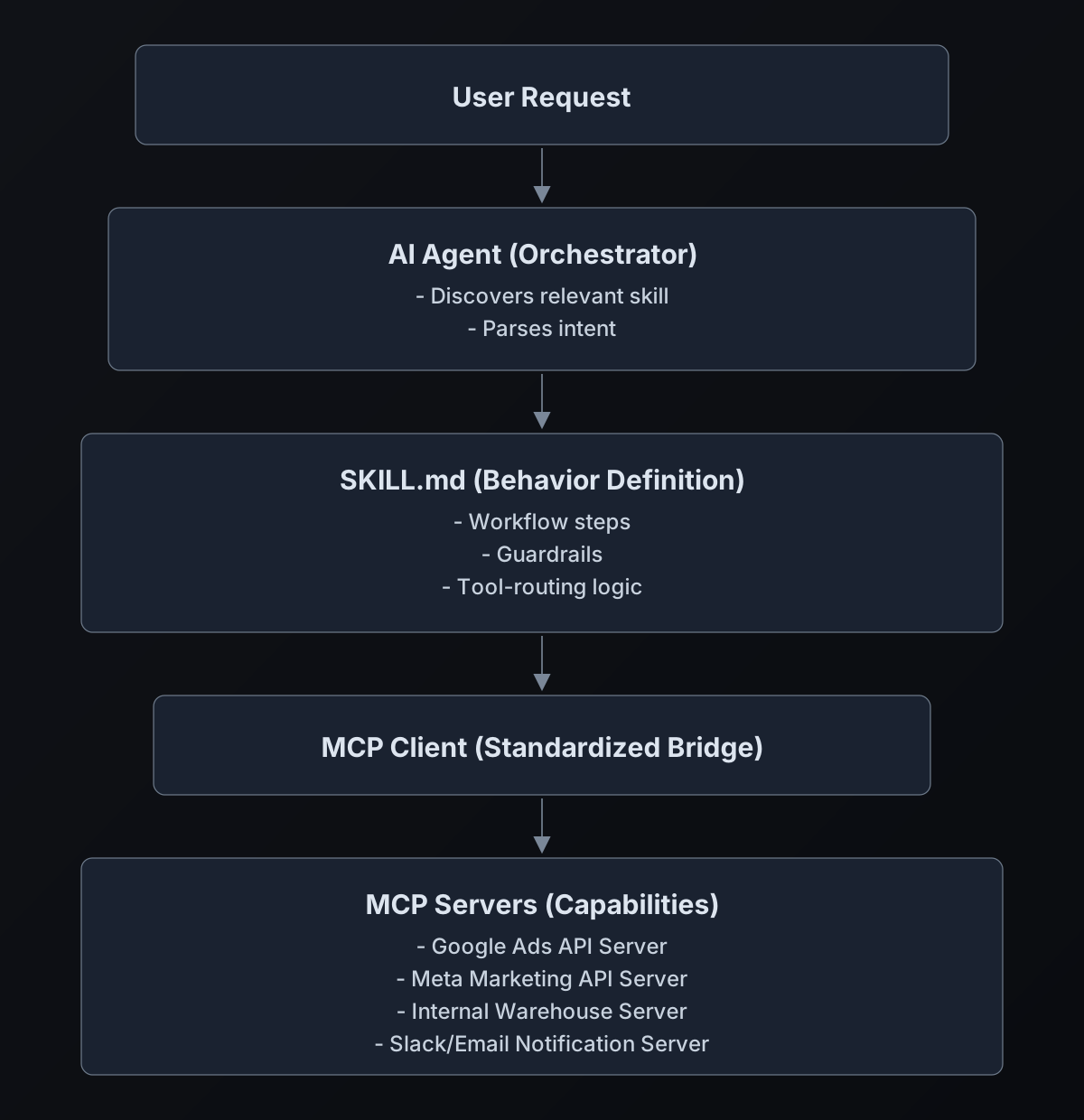
Real-world flow: Your “Weekly Performance Review” skill might:
- Query Google Ads via MCP server
- Query Meta Ads via MCP server
- Query your data warehouse via internal MCP server
- Run local script to merge and analyze
- Format narrative and send via Slack MCP server
Security Considerations
Skills do not have to go through MCP - they can contain arbitrary instructions and bundled scripts that execute outside the MCP boundary. The Agent Skills spec puts almost no restriction on the markdown body; it can include shell commands.
Critical takeaway: MCP alone is not a safety guarantee. You still need:
- Robust skill design and review processes
- Sandboxing for script execution
- Input validation and output sanitization
- Audit logging for agent actions
Module 6: The “Agent Architect” Mindset
Design Principles Checklist
Before building any skill, run through this:
-
Define the outcome, not steps
Start from the stakeholder need, not the technical implementation. -
Decide what’s scripted vs. agent-handled
- Reproducible, numeric logic → Scripts/config
- Interpretation, creative language, trade-offs → Agent
-
Write clear “When to use” triggers
Describe user intents precisely so the agent routes correctly. -
Constrain inputs and outputs
Specify required inputs and output shape (sections, tables, JSON fields). -
Add guardrails and failure modes
- What if tools fail? (fallback to CSV, ask user)
- Never fabricate numbers
- Surface uncertainty explicitly
-
Test with realistic scenarios
Provide 3-5 example user prompts and expected behaviors in skill docs.
Module 7: Course Projects - Build Your Portfolio
Choose one project to implement end-to-end:
| Project | Patterns Used | Difficulty |
|---|---|---|
| Meta/Google Weekly Performance Reviewer | A + E | Beginner |
| Creative Workshop for PMax + Reels | B | Intermediate |
| Lifecycle Experiment Planner | C | Intermediate |
| Policy + Brand Compliance Checker | D | Intermediate |
| SEO → Paid Search Synergy Skill | A + B | Advanced |
| Analyst Co-pilot on BigQuery/Redshift | A + E + F | Advanced |
Implementation path:
- Phase 1: SKILL.md only (no scripts) - get the workflow right
- Phase 2: Add MCP tool connections
- Phase 3: Add scripts for deterministic logic
- Phase 4: Deploy and share with team
Module 8: Open-Source Operating Model (Guide Repo + Skills Repo)
To keep this guide focused and practical, all concrete skill packages and runnable examples are maintained in a separate open-source repository:
If you build marketing or ad-tech skills from this tutorial, publish your version there and contribute improvements back so the playbook compounds for everyone.
Module 9: 30-Day Team Adoption Roadmap
If you want this to stick inside a marketing org, run it as a four-week rollout:
- Week 1: Select one repetitive workflow and ship a
SKILL.md-only version. - Week 2: Add scripts/config for deterministic logic and define failure handling.
- Week 3: Add 2-3 related skills and publish a shared internal skill index.
- Week 4: Connect to MCP or internal tools, run reviews, and formalize ownership.
Deliverable by Day 30: a small, tested, shared skill library tied to live business workflows.
Conclusion: From Passive User to Active Architect
The marketing and ad tech professionals who thrive in the next five years won’t be those who master the most SaaS dashboards. They’ll be the ones who can orchestrate AI agents to work across those dashboards, encoding their domain expertise into reusable skills that scale.
You don’t need to become a software engineer. You need to become an agent architect: someone who understands how to decompose marketing workflows into intent, tools, and guardrails; who can prototype automations that off-the-shelf tools can’t provide; who shapes the AI stack rather than waiting for vendors to catch up.
Start with one skill. One repetitive workflow you know by heart. Encode it, test it, iterate it. Then build another. The compound effect of these skills - shared across your team, improved over time - creates defensibility that no commoditized AI feature can match.
The tools are ready. The protocols are standardized. The only question is who will architect the future of marketing AI.
Resources & Further Reading
- Agent Skills Specification
- MCP Documentation
- Codex Skills Guide
- Claude Code Skills
- Our Skills Registry
Ready to build? Start with Pattern A. Pick one report you run weekly. Write the SKILL.md. Test it. That’s your first step from user to architect.