The Anatomy of a Marketing Agent: From Skills to Orchestrated Intelligence
In our previous guide on Agent Skills, we explored how to package domain expertise into reusable skill files that transform generic LLMs into specialized marketing assistants. Skills are powerful. But they’re not agents.
An agent is a model plus memory plus tools plus skills plus a role. It’s the thing that uses skills, not the skill itself.
This distinction matters more than it might seem. Simon Willison’s Agentic Engineering Patterns project frames the challenge clearly: we’re entering an era where coding agents can both generate and execute code, testing and iterating independently of turn-by-turn human guidance. The same principle applies to marketing agents. The question isn’t whether to build them. It’s how to build them well.
This guide is the second installment in our series on agentic marketing systems. Where the skills guide taught you to write the playbook, this guide teaches you to build the player.
Contents
Part I: Foundations
- What Is an Agent, Really?
- The Five Components of Agent Architecture
- Skills vs. Tools vs. MCP: Untangling the Stack
Part II: Building Your First Marketing Agent
- Anatomy of a Marketing Agent
- Turning a Coding Agent into a Marketing Agent
- The Intelligence Layer: Where Decisions Live
Part III: Multi-Agent Systems
Part IV: Implementation
What Is an Agent, Really?
The term “agent” has been stretched to meaninglessness. Every chatbot claims to be an agent. Every automation tool adds “agentic” to its marketing. But there’s a real distinction worth preserving.
A model answers questions. You prompt, it responds. Stateless. Reactive.
An agent pursues goals. It maintains state across interactions. It decides which tools to use. It can recover from errors and try different approaches. Most importantly: it can act in the world, not just describe actions.
The difference between asking Claude “how would I query our GA4 data?” and having an agent that actually queries your GA4 data, interprets the results, identifies anomalies, and recommends actions - that’s the difference between a consultant and an employee.
Here’s a working definition we’ll use throughout this guide:
Agent = Model + Memory + Tools + Skills + Role
Each component serves a distinct function:
- Model: The LLM “brain” that reasons, plans, and generates
- Memory: Context that persists across interactions (past conversations, documents, brand guidelines, campaign history)
- Tools: Concrete actions the agent can take (query databases, send emails, call APIs, execute code)
- Skills: Packaged expertise that tells the agent how to use tools to achieve specific tasks
- Role: The persona, goals, and constraints that define what the agent is trying to accomplish
Remove any one of these, and you lose something essential. A model without tools is just a chatbot. A model with tools but no skills is dangerous - capability without wisdom. A model with skills but no role is directionless.
The Five Components of Agent Architecture
Let’s examine each component more closely.
1. The Model (The Brain)
This is the LLM at the center of your agent. Claude, GPT, Gemini - the reasoning engine that processes context and generates responses.
For marketing applications, model selection matters less than you might think. The differences between frontier models are marginal compared to the differences in how you prompt, tool, and skill them. A well-architected agent on Claude Sonnet will outperform a poorly architected agent on Opus.
What matters more:
- Context window: Can your model hold enough information to reason effectively?
- Tool use reliability: How well does the model follow tool-calling conventions?
- Instruction following: Does it respect system prompts and skill constraints?
2. Memory (The Context)
Memory is what makes an agent feel like a colleague rather than a stranger you meet fresh each day.
Types of memory in marketing agents:
- Conversation memory: What you’ve discussed in this session
- Cross-session memory: What you’ve discussed in past sessions (Claude’s persistent memory, custom RAG systems)
- Document memory: Brand guidelines, playbooks, historical campaigns
- State memory: Where you are in a multi-step workflow
- Data memory: Recent performance data, audience segments, experiment results
The technical implementation varies - vector databases, conversation logs, structured state objects - but the principle is consistent: an agent needs to know where it’s been to decide where to go.
3. Tools (The Muscles)
Tools are concrete capabilities: actions the agent can take in the world.
Common tools for marketing agents:
- Data retrieval: Query GA4, pull warehouse metrics, fetch CRM records
- Content operations: Read/write documents, generate images, publish to CMS
- Communication: Send emails, post to Slack/Teams, create tickets
- Platform APIs: Adjust bids, create audiences, pause campaigns
- Code execution: Run analysis scripts, transform data, generate reports
Tools answer the question: “What can I do?”
The critical insight: tools alone are dangerous. An agent with database access but no understanding of when to use it or what results mean will make mistakes. This is why tools must be paired with skills.
4. Skills (The Know-How)
Skills are where domain expertise lives. They’re packaged workflows that tell the agent how to use tools to achieve specific outcomes.
The skill we built in our previous guide - a weekly performance review skill - combines:
- Instructions for interpreting metrics
- Templates for structuring analysis
- Decision logic for prioritizing findings
- Error handling for common edge cases
- Output formatting for stakeholder consumption
The skill wraps tools. It adds:
- Sequencing: Which tools to call in what order
- Judgment: When to use which capability
- Recovery: What to do when things go wrong
- Quality gates: How to evaluate outputs before delivering them
5. Role (The Identity)
Role is the character your agent plays. It encompasses:
- Persona: Who is this agent? A senior performance marketer? A creative strategist? A data analyst?
- Goals: What is this agent trying to accomplish?
- Constraints: What is this agent not allowed to do?
- Style: How should this agent communicate?
Role is typically encoded in the system prompt, but it can also be distributed across skills and tool permissions.
Example role definition:
You are the Performance Analytics Agent for Acme Corp's marketing team.
Your goal is to help the team understand campaign performance and
identify optimization opportunities.

You have access to GA4, BigQuery, and our internal metrics dashboard.
You can read and analyze data, but you cannot make changes to live campaigns.
All recommendations must be reviewed by a human before implementation.

Your audience is experienced marketers who want insights, not tutorials.
Be direct. Lead with conclusions. Support with evidence.
Skills vs. Tools vs. MCP: Untangling the Stack
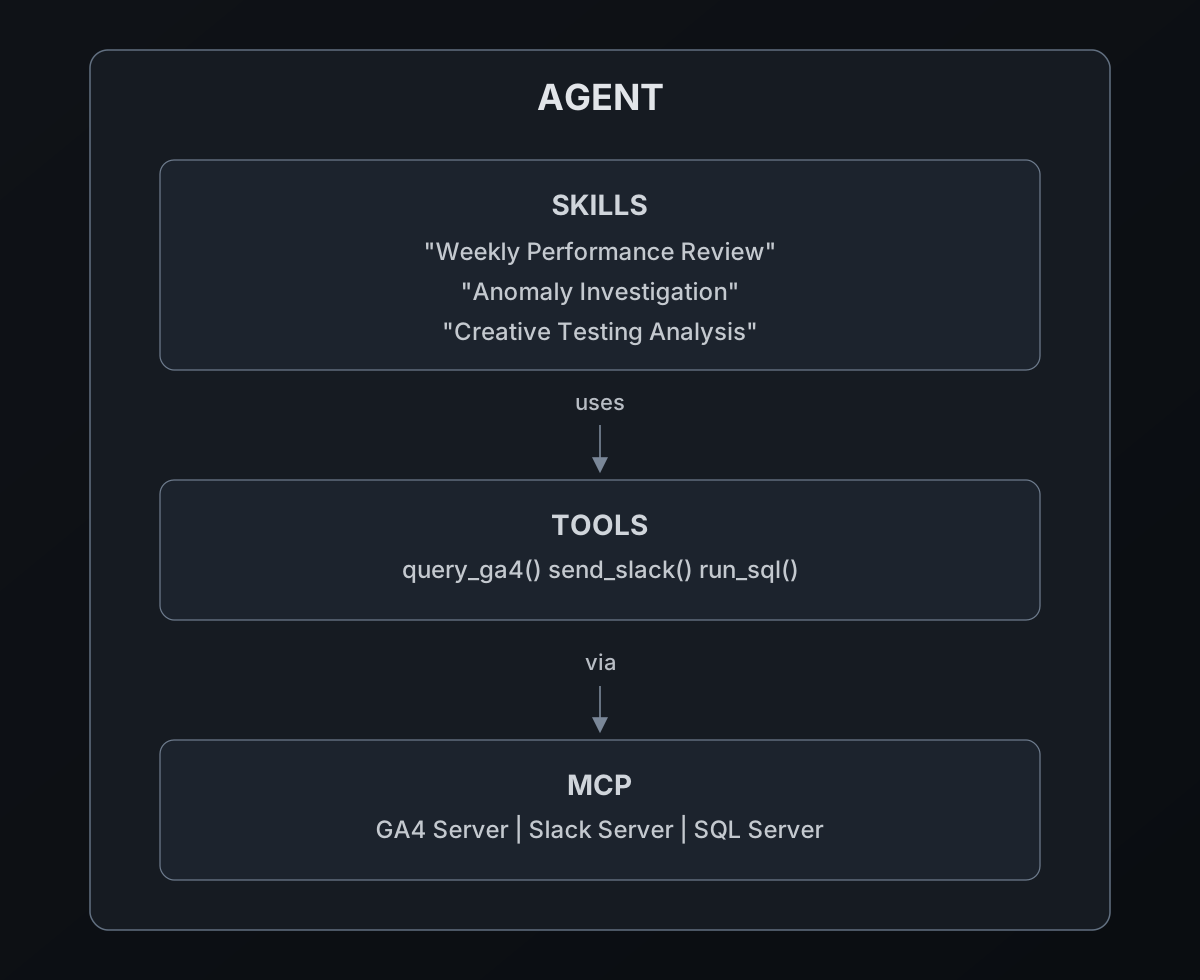
One of the most common points of confusion in agent development is the relationship between skills, tools, and MCP. Let’s clarify.
Tools answer: “What can I do?”
Atomic capabilities. Fetch data. Send email. Run SQL. Tools are technical interfaces to external systems.
Skills answer: “How do I do it well?”
Workflows and expertise. A skill might use multiple tools, include decision logic, handle errors gracefully, and produce polished outputs.
MCP answers: “How do I connect to the outside world?”
The Model Context Protocol is a standardized way for agents to discover and call external tools and data sources. Think of it as USB-C for AI integrations - a universal connector that replaces bespoke adapters.
Here’s how they layer:
Practical example:
Your marketing analytics agent needs to review weekly performance. Here’s how the layers interact:
- Agent receives request: “Give me the weekly performance summary”
- Agent selects skill: “Weekly Performance Review” skill
- Skill orchestrates workflow:
- Call
fetch_ga4_metricstool for current week - Call
fetch_ga4_metricstool for comparison period - Call
query_warehousetool for conversion data - Apply analysis logic from skill instructions
- Generate structured report
- Call
- Tools execute via MCP:
- GA4 MCP server handles authentication and API calls
- Warehouse MCP server manages SQL connection
- Agent delivers output with skill-defined formatting
The skill is the intelligence layer that decides how to use the tools. MCP is the infrastructure layer that makes tools accessible in a standardized way.
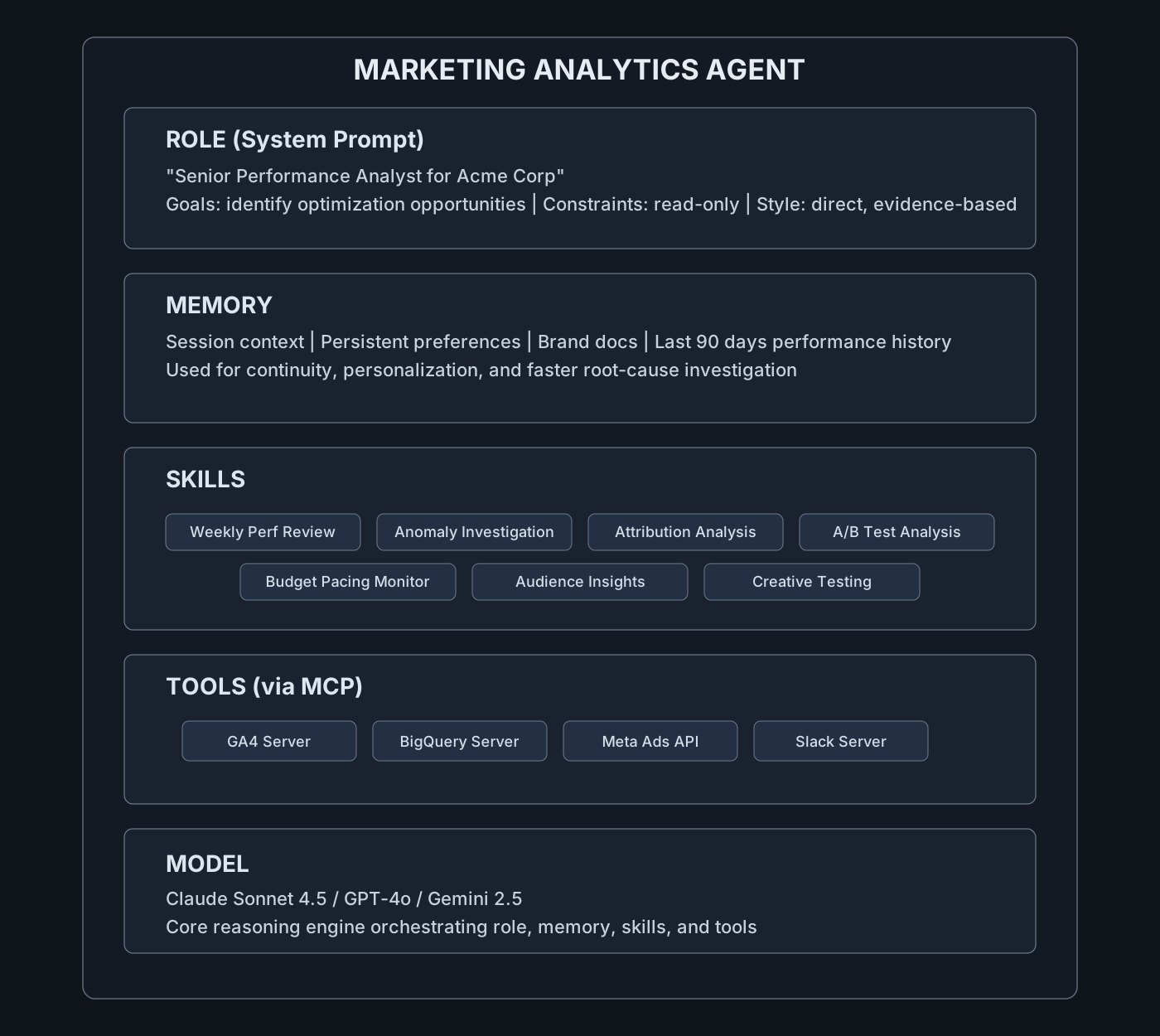
Anatomy of a Marketing Agent
Let’s make this concrete. Here’s the complete anatomy of a real marketing agent:
Information Flow
When a user asks: “Why did our conversion rate drop last week?”
- Role shapes how the agent approaches the question (analytical, hypothesis-driven)
- Memory provides relevant context (past campaigns, known issues, user preferences)
- Agent selects appropriate skill (“Anomaly Investigation”)
- Skill orchestrates multi-step analysis:
- Pull conversion data from BigQuery
- Pull traffic data from GA4
- Pull campaign changes from Meta Ads
- Correlate timing of changes with metric drops
- Generate prioritized hypothesis list
- Tools execute the data fetches via MCP
- Agent synthesizes findings and presents to user
- Memory stores this analysis for future reference
Turning a Coding Agent into a Marketing Agent
One of the most practical paths to a marketing agent is converting an existing coding agent - Claude Code, Codex, or similar - into a marketing-specialized system.
These agents already have:
- Built-in tools for file I/O, shell commands, code execution
- Skills support (they auto-discover SKILL.md files)
- Robust tool-calling infrastructure
What they lack is marketing context. Here’s how to add it:
Step 1: Install Marketing Skills
Place your marketing skills where the coding agent can discover them:
~/.claude/skills/marketing/weekly-performance-review/SKILL.md
~/.claude/skills/marketing/anomaly-investigation/SKILL.md
~/.claude/skills/marketing/creative-lab/SKILL.md
~/.claude/skills/marketing/attribution-analysis/SKILL.md
~/.claude/skills/marketing/budget-pacing-monitor/SKILL.md
Each skill file follows the format from our previous guide - structured instructions that tell the agent how to perform specific marketing tasks.
Step 2: Connect Marketing Tools via MCP
Run MCP servers for your marketing data sources:
# GA4 analytics
npx @anthropic/mcp-server-ga4

# BigQuery warehouse
npx @anthropic/mcp-server-bigquery

# Meta Ads
npx @your-org/mcp-server-meta-ads

# Slack for notifications
npx @modelcontextprotocol/server-slack
Grant the coding agent access to these servers through its tool configuration (typically in .claude/config.json or equivalent).
Step 3: Adjust the Agent Persona
You don’t have direct access to the system prompt of Claude Code or Codex. Instead, you shape the agent’s behavior through project-level configuration files that the agent reads at startup.
For Claude Code: Create a CLAUDE.md file in your project root:
# CLAUDE.md

## Role
You are a digital marketing and ad-tech co-pilot for Acme Corp.

## Primary Behavior
Your primary role is marketing analysis and optimization.
Prefer using marketing skills and data tools before writing code.

When asked about performance, start with the relevant skill.
When code is needed, write scripts that work with our data sources.

## Available Resources
- GA4 (via MCP)
- BigQuery (via MCP)
- Meta Ads API (via MCP)
- Slack (via MCP)

## Constraints
- You can read data and generate analyses
- You cannot make live changes to campaigns without explicit approval
- Always explain your reasoning before taking actions
For Codex: Create an AGENTS.md file following the AGENTS.md spec:
# AGENTS.md

## Identity
Digital marketing analyst for Acme Corp

## Goals
- Analyze marketing performance data
- Identify optimization opportunities
- Generate actionable recommendations

## Preferred Tools
- Marketing skills over raw code
- MCP data tools for analytics queries

## Boundaries
- Read-only access to campaign data
- No live changes without human approval
These files are read by the agent at the start of each session and shape how it interprets requests, selects tools, and structures its responses. Think of them as “soft system prompts” - they influence behavior but don’t override the agent’s core instructions. Be careful with what you put in these files to avoid context bloat or agents halucination. Check this recent research on the use of Agent.md files.
Step 4: (Optional) Limit Code Tools
For non-engineer users, you may want to restrict shell/write access while keeping data and analysis tools available:
{
  "tools": {
    "allowed": ["ga4_query", "bigquery_sql", "slack_post", "file_read"],
    "disallowed": ["shell_exec", "file_write", "file_delete"]
  }
}
The result: The same Claude Code or Codex runtime becomes a marketing engineer that still writes scripts when needed but operates in a marketing context first.
The Intelligence Layer: Where Decisions Live
The “intelligence layer” is everything in an agent skill that is not just “call this tool.” It’s how the skill perceives, decides, and adapts.
Within an Agent Skill, the intelligence layer covers:
- Interpretation: Turning messy user intent + context into a clear internal task and plan
- Planning: Deciding which tools/skills to call, in what order, with what parameters
- Control flow: Branching, retries, fallbacks, when to stop, when to escalate
- Evaluation: Checking if outputs look “good enough” and whether another step is needed
- Governance: Applying policies and constraints (compliance, cost, safety)
Implementation Patterns
Pattern 1: Context Grounding
Pull the right context before acting:
## Before Analysis

1. Retrieve latest performance data via GA4 tool
2. Retrieve relevant brand/strategy docs from memory
3. Check for recent changes or known issues
4. Only then generate analysis, explicitly citing sources
Pattern 2: Plan–Execute–Check Loop
Make the skill self-reflective:
## Analysis Workflow

### Step 1: Plan
- Parse the request
- Identify relevant metrics and timeframes
- Outline analysis steps

### Step 2: Execute
- Pull required data
- Compute comparisons
- Identify patterns or anomalies

### Step 3: Check
- Verify data looks reasonable
- Confirm analysis addresses the original question
- If criteria not met, refine or re-run specific steps
Pattern 3: Rule + Model Hybrid
Combine hard constraints with model reasoning:
Where possible, implement numeric thresholds and compliance checks in scripts or config files (not only prompt text) to improve reproducibility and auditability.
## Constraints (Non-Negotiable)

- Never recommend budget increases >20% without flagging
- Always include statistical significance for A/B test conclusions
- Flag any metric that moves >3 standard deviations

## Flexible Decisions (Model Discretion)

- Prioritization of insights
- Level of detail in explanations
- Tone adjustments for audience
Pattern 4: Scoring and Self-Evaluation
Let skills self-score and take different paths:
## Output Quality Check

Before delivering, score your analysis:
- Clarity (1-5): Is the main point obvious?
- Completeness (1-5): Are all relevant factors addressed?
- Actionability (1-5): Are recommendations specific and implementable?

If any score < 3, revise that aspect before delivering.
If all scores ≥ 4, proceed to delivery.
When One Agent Isn’t Enough
Single agents work well for focused tasks. But marketing involves multiple specialized functions: research, strategy, creative, operations, analytics. Each requires different expertise and tools.
This is where multi-agent systems become valuable.
Single agent: One “brain” handles everything. Works for well-defined, focused tasks.
Multi-agent: Multiple specialized agents collaborate. Each has its own role, memory, and tools. They pass work between them.
| Aspect | Single Agent | Multi-Agent |
|---|---|---|
| Complexity | Simpler to build and debug | More moving parts |
| Specialization | Jack of all trades | Deep expertise per domain |
| Scalability | Adds capabilities = bigger context | Adds capabilities = new agents |
| Parallelization | Sequential only | Can run in parallel |
| Failure modes | Single point of failure | Partial failures possible |
When to use multi-agent:
- Tasks requiring deep expertise in multiple domains
- Workflows that benefit from parallel execution
- Systems where different roles need different permissions
- Complex campaigns where separation of concerns improves quality
Orchestration Patterns for Marketing
Three primary patterns emerge in marketing multi-agent systems:
Pattern 1: Sequential Pipeline
Research → Strategy → Creative → QA → DistributionWork flows through specialized stages. Each agent completes its work before passing to the next.
Best for: Content production, campaign planning, sequential workflows where each stage depends on the previous.
Example: Campaign development pipeline
- Research Agent analyzes market, audience, competitors → produces brief
- Strategy Agent defines objectives, channels, offers → produces plan
- Creative Agent generates copy, concepts, assets → produces creative package
- QA Agent checks brand, policy, quality → produces approval or revision requests
- Distribution Agent schedules, publishes, monitors → produces execution report
Pattern 2: Parallel Fan-Out
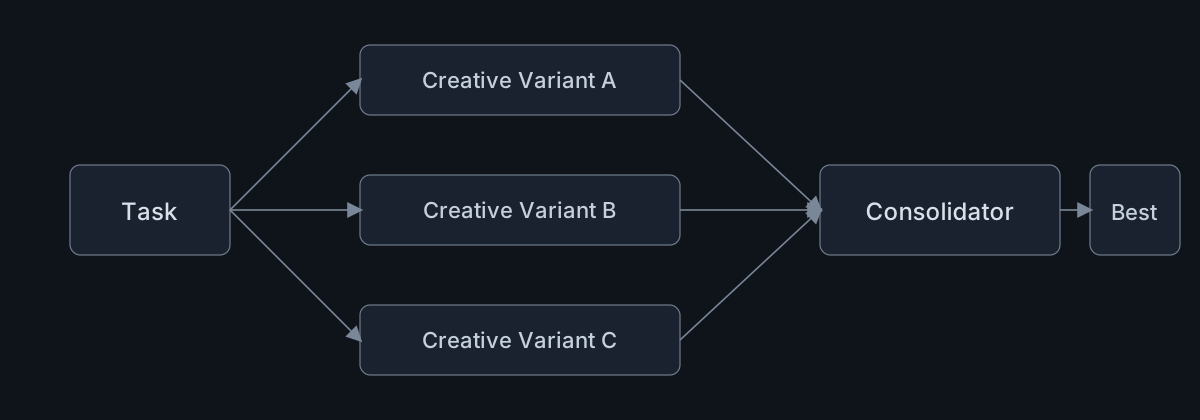
Multiple agents work on the same task simultaneously. A consolidator merges and ranks results.
Best for: Creative exploration, A/B test generation, tasks where diversity improves outcomes.
Example: Ad copy generation
- Orchestrator receives request: “Generate ad copy for new product launch”
- Creative Agent A (bold/disruptive voice) generates options
- Creative Agent B (trust/proof voice) generates options
- Creative Agent C (humor/pattern-interrupt voice) generates options
- Critic Agent evaluates all options, ranks by expected performance, flags compliance issues
Pattern 3: Hub-and-Spoke (Supervisor)
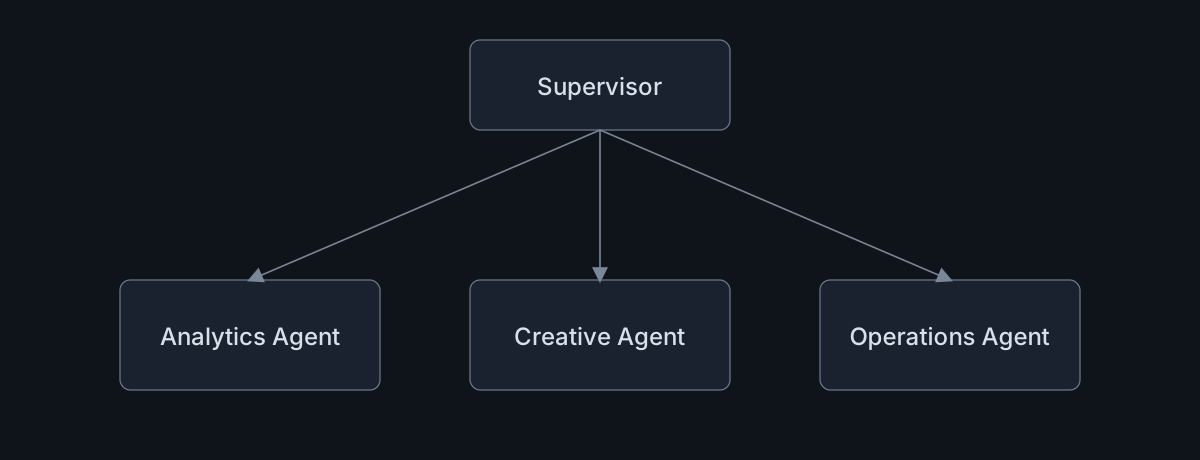
A central supervisor coordinates work, assigns tasks to specialists, and synthesizes results.
Best for: Complex, multi-part requests that require coordination across domains.
Example: Campaign optimization request
- User asks: “Why is our Q2 campaign underperforming and what should we do?”
- Supervisor decomposes:
- Analytics Agent: Pull performance data, identify problem areas
- Creative Agent: Review creative performance, generate improvement ideas
- Operations Agent: Check execution (targeting, bidding, scheduling)
- Supervisor synthesizes findings into unified recommendation
Multi-Agent Examples
Let’s examine three concrete multi-agent systems that can be used in marketing:
Example 1: Content Intelligence Network
Content Strategist Agent
- Analyzes industry trends, competitor content, SEO gaps
- Identifies content themes and keyword opportunities
- Produces content briefs and editorial calendar recommendations
Personalization Agent
- Segments visitors by industry, role, behavior
- Adapts messaging per segment
- A/B tests variations automatically
Performance Optimization Agent
- Monitors engagement and conversion metrics
- Reorders content priority based on performance
- Recommends retirement of underperforming content
Expected Results: increase in qualified leads, improvement in website-to-call conversion, reduction in content-related ad spend.
Example 2: PPC Intelligence Network
Keyword & Bidding Agent
- Continuously analyzes keyword performance
- Adjusts bids based on conversion probability
- Identifies new keyword opportunities
Creative Agent
- Monitors ad copy performance
- Generates responsive search ad variations
- Tests headlines and descriptions
Funnel & Landing Agent
- Tracks conversion paths
- Flags landing page issues
- Suggests layout and messaging changes
Expected Results: efficiency improvement, enrollment increase (higher education client).
Example 3: ABM Demand Generation Workflow
Research Agent
- Enriches leads with firmographics and intent data
- Scores account fit and engagement
Scoring Agent
- Dynamically adjusts scores based on behavior
- Updates CRM/warehouse in real-time
Personalization Agent
- Crafts tailored outreach per account
- Adjusts messaging based on engagement signals
Channel Agent
- Selects best channel per contact (email, LinkedIn, phone)
- Optimizes send timing
Expected Results: High-touch campaigns that adapt automatically to intent signals, with improvement in target account engagement.
Your First Agent: A Step-by-Step Build
Let’s build a simple but complete marketing agent. We’ll create a “Performance Review Agent” that can:
- Pull data from GA4
- Compare periods
- Identify significant changes
- Generate prioritized recommendations
Step 1: Define the Role
# Performance Review Agent

## Identity
You are a senior performance analyst specializing in digital marketing analytics.

## Goal
Help marketing teams understand campaign performance and identify optimization opportunities.

## Constraints
- Read-only access to data sources
- Cannot make live changes to campaigns
- All recommendations must include supporting evidence

## Communication Style
- Lead with conclusions
- Support with data
- Be direct and specific
- Assume audience knows marketing fundamentals
Step 2: Set Up Memory
For a basic agent, we need:
- Session memory (handled by the model)
- Document memory (brand guidelines, metric definitions)
Create a context file:
# Acme Corp Marketing Context

## KPI Definitions
- Primary KPI: Revenue
- Secondary KPIs: Conversion Rate, ROAS, CAC
- Efficiency targets: ROAS > 3.0, CAC < $50

## Business Context
- B2B SaaS company
- Average deal size: $15,000/year
- Sales cycle: 45-60 days
- Primary channels: Paid Search, LinkedIn, Content

## Analysis Preferences
- Always compare to prior period (WoW, MoM)
- Flag changes > 10% as significant
- Prioritize revenue-impacting insights
Step 3: Create the Core Skill
Following our skills guide format:
---
name: weekly-performance-review
description: Analyze weekly marketing performance, compare against prior period, and generate prioritized recommendations with clear evidence and limitations.
---

# Weekly Performance Review

## When to use
Use when the user asks about weekly performance, campaign results, trend changes, or optimization priorities.

## Inputs required
- date_range (default: last 7 days)
- comparison_range (default: prior 7 days)
- channels (paid_search, paid_social, organic, email)
- account_ids or data source identifiers

## Workflow

### 1. Data Collection
- Fetch current week metrics from GA4 (sessions, conversions, revenue by channel)
- Fetch prior week metrics for comparison
- Fetch current week ad spend from ad platforms

### 2. Analysis
For each channel, calculate:
- Absolute change (current - prior)
- Percentage change
- Statistical significance (where applicable)
- Efficiency metrics (ROAS, CPA, CVR)

### 3. Prioritization
Rank findings by:
1. Revenue impact (highest priority)
2. Percentage change magnitude
3. Actionability

### 4. Output Structure

## Summary
[One-paragraph executive summary]

## Top 3 Insights
1. [Highest priority finding + recommendation]
2. [Second priority]
3. [Third priority]

## Channel Performance
[Table comparing all channels WoW]

## Recommended Actions
[Specific, actionable next steps]

## Guardrails
- Never fabricate numbers. If data is missing, state limitations explicitly.
- If key data sources fail, ask for manual exports/CSV and continue with available evidence.
- Flag low-confidence conclusions when sample size is insufficient.
- Keep recommendations within allowed operating constraints and require explicit approval for live changes.

## Failure modes
- If GA4 data unavailable: Notify user, suggest manual data input
- If incomplete data: Proceed with available data, note gaps
- If no significant changes: Report stability, suggest testing opportunities
Step 4: Connect Tools via MCP
For a minimal working agent, connect GA4:
# Start GA4 MCP server
npx @anthropic/mcp-server-ga4 --property-id YOUR_PROPERTY_ID
Configure your agent to use this server (specific configuration depends on your agent runtime).
Step 5: Test and Iterate
Start simple: “Show me last week’s performance.”
Check:
- Does the agent select the right skill?
- Does it pull data correctly?
- Does the analysis make sense?
- Is the output well-formatted?
Iterate based on gaps. Common early fixes:
- More specific skill instructions
- Better error handling
- Clearer output templates
- Additional context in memory
Governance and Safety
Agents with real capabilities need real guardrails.
Permission Scoping
Different agents should have different permissions:
Analytics Agent:
  ✓ Read GA4, BigQuery, CRM
  ✗ Modify campaigns
  ✗ Send external communications

Operations Agent:
  ✓ Read/write campaign settings
  ✓ Adjust budgets within limits
  ✗ Delete campaigns
  ✗ Access financial data

Creative Agent:
  ✓ Generate content
  ✓ Submit for review
  ✗ Publish directly
  ✗ Access performance data
Rate Limits and Spending Caps
Agents can make mistakes. Limit the damage:
API Calls: Max 100/minute
Database Queries: Max 50/minute
Budget Changes: Max $1000/day
Campaign Changes: Requires human approval
Audit Logging
Log everything agents do:
- What skill was invoked
- What tools were called
- What data was accessed
- What outputs were generated
- What recommendations were made
Human-in-the-Loop
For high-stakes actions, require human approval:
## Approval Requirements

### Auto-approve (Agent Can Execute)
- Read any analytics data
- Generate reports
- Create draft content

### Request Review (Agent Proposes, Human Approves)
- Budget changes > $100
- Audience changes
- New campaign creation

### Never Automate
- Account structure changes
- Billing modifications
- Access permission changes
Reviewer Agents
For compliance-heavy industries, add a reviewer agent:
Creative Agent generates → Compliance Agent reviews → [Approve/Reject/Modify]The reviewer agent checks:
- Brand guideline compliance
- Legal requirements
- Platform policies
- Factual accuracy
What Comes Next
This guide has covered the architecture of marketing agents - how they’re built, how they work, and how to start building your own.
In upcoming guides, we’ll go deeper:
Next Week: Tools and MCP for Marketing
- Building your own MCP servers for marketing platforms
- Integrating GA4, Meta Ads, Google Ads, and warehouse data
- Tool design patterns that work well with skills
Week After: Multi-Agent Orchestration
- Framework comparison (Swarms, CrewAI, LangGraph)
- Building a campaign planning swarm
- Coordination and state management patterns
Coming Soon: The Marketing Agent Registry Similar to our Skills Registry, we’re building an open registry of marketing agent templates - complete configurations you can deploy and customize.
Final Thoughts: Agents as Colleagues
The agents we’re building aren’t replacements for marketers. They’re colleagues - specialized team members who handle specific aspects of the work.
A good human-agent team looks like:
- Humans set strategy, make judgment calls, build relationships, handle exceptions
- Agents execute routine analysis, monitor continuously, flag anomalies, generate drafts
The goal isn’t automation for its own sake. It’s freeing human attention for the work that actually requires human judgment while ensuring the routine work gets done reliably and consistently.
Every agent you build should answer: “What would a skilled junior marketer do 100 times a day that I’d rather have done automatically, accurately, and without fatigue?”
Build those agents first. The sophisticated orchestration can come later.
Further Reading:
- Simon Willison’s Agentic Engineering Patterns — philosophical foundation
- Swarms Framework — multi-agent orchestration
- Claude Code Skills — skill authoring
- MCP Specification — tool integration
- Our Skills Registry — reusable marketing skills register