Harnessing the Leak: What Claude Code’s Exposed Architecture Teaches Us About Marketing Agent Design
A Practitioner’s Guide to Production-Grade Harness Patterns for Marketing and Ad-Tech Agents
This is the seventh guide in our series on agentic marketing systems. The first taught you to write skills. The second explained agent anatomy. The third wired tools and MCP. The fourth built a working OpenClaw marketing agent. The fifth covered maintenance and security harnesses. The sixth introduced portable plugins.
This guide changes the source material. Instead of building from first principles, we are reverse-engineering production architecture from an accidental disclosure.
On March 31, 2026, Anthropic shipped version 2.1.88 of their Claude Code package to npm with a source map file that should have been excluded. Within hours, the complete TypeScript source - 512,000 lines across 1,900 files - was mirrored, forked, and dissected by thousands of developers. Anthropic confirmed the leak, removed the package, and issued takedown notices. By then, the architecture was public.
The leak is not a security catastrophe. No model weights escaped. No customer data was exposed. What did escape is something more useful to practitioners: the first detailed look at how Claude Code coding agent harness actually works at scale.
This guide extracts the patterns that matter for marketing and ad-tech teams building their own agent systems. The source is not just the leaked code itself but the wave of reverse-engineering analysis that followed - including Engineer’s Codex’s walkthrough, The New Stack’s architecture breakdown, Build.ms’s analysis, and Claw Decode’s structured catalog of features and timelines.
We are here to learn from the most documented production agent harness in existence and apply those lessons to our own work.
Contents
Part I: The Harness Revealed
Part II: The Memory Architecture
- Three-Layer Memory Design
- Auto Memory and Auto Dream
- Marketing Application: Campaign Knowledge Persistence
Part III: The Subagent System
- Fork-Join Parallelism with Cache Reuse
- Subagent Types and Specialisation
- Marketing Application: Parallel Platform Analysis
Part IV: The Permission Architecture
- Five Permission Modes
- Declarative Permission Rules
- Marketing Application: Risk-Tiered Campaign Control
Part V: The Tool Ecosystem
- The Default Tool Set
- Tool Result Sampling and Deduplication
- Marketing Application: API Efficiency Patterns
Part VI: Unreleased Patterns
- KAIROS: The Background Daemon
- ULTRAPLAN: Cloud-Offloaded Planning
- Marketing Application: Always-On Monitoring
Part VII: Context Management
- Context Compaction Strategies
- Session Memory and Instant Recovery
- Marketing Application: Long-Running Campaign Sessions
Part VIII: Implementation Patterns
- Translating Patterns to Your Stack
- Reference Architecture for Marketing Harnesses
- Implementation Path
Conclusion: From Leak to Learning
Part I: The Harness Revealed
What Actually Leaked
The exposure happened through a classic build-system error. Bun, the JavaScript runtime that Claude Code uses, generates source maps by default for debugging. Someone failed to exclude the .map file from the npm package, and that file pointed to a zip archive on Anthropic’s cloud storage containing the complete, unobfuscated source.
Security researcher Chaofan Shou noticed the anomaly within hours of publication. By the time Anthropic pulled version 2.1.88, the code had been archived across GitHub, IPFS, and Chinese developer forums. Within a day, forks had accumulated over 30,000 stars.
What the mirrors contain:
The full agentic harness. 1,900 TypeScript files implementing the orchestration layer that sits around Claude and turns a language model into a coding agent. This is not model weights, it is the software that decides when to invoke tools, how to manage context, when to spawn subagents, and how to present results.
The tool system. Over 40 tools with their schemas, permission checks, and execution logic. The default set includes BashTool, FileReadTool, FileEditTool, FileWriteTool, GlobTool, GrepTool, WebFetchTool, WebSearchTool, AgentTool, SkillTool, and several more.
The memory architecture. A three-layer system with MEMORY.md indexes, topic files loaded on demand, and session transcripts that can be searched. Plus the Auto Dream consolidation system that runs during idle periods.
The permission system. Five distinct modes with declarative allow/deny/ask rules, glob pattern matching, and per-tool granularity.
44 feature flags. Capabilities that are built and tested but not shipped externally - including KAIROS (background daemon mode), ULTRAPLAN (cloud-offloaded planning), COORDINATOR MODE (multi-agent swarms), and the BUDDY companion system.
Internal model codenames. Capybara (Claude 4.6 variant), Fennec (Opus 4.6), Tengu, Numbat. These confirm internal roadmap details that were previously speculative.
What did not leak: model weights, training data, customer data, API credentials, or production infrastructure details. The harness is the product layer - significant intellectual property, but not the core model capabilities.
Why This Matters for Marketing Agents
If you are building marketing agents - whether for performance analysis, campaign automation, creative generation, or reporting - you face the same architectural challenges Claude Code solves:
Context management. Marketing agents work with large datasets - campaign metrics, creative assets, audience segments, historical performance. How do you keep the relevant context available without overwhelming the model’s window?
Memory persistence. Marketing work spans sessions. A campaign runs for weeks. Performance patterns emerge over months. How does the agent remember what it learned yesterday, last week, last quarter?
Parallel execution. Marketing teams work across platforms. You need GA4 data, Meta Ads data, and Google Ads data in the same analysis. How do you gather them efficiently?
Permission control. Marketing agents touch real money and real brand reputation. Changing a bid, pausing a campaign, or publishing creative has consequences. How do you control what the agent can do autonomously versus what requires approval?
Background processing. Marketing anomalies happen at 3 AM. Performance degradation does not wait for business hours. How does the agent monitor and alert without constant human supervision?
Claude Code solves all of these problems for the coding domain. The patterns transfer directly to marketing, with appropriate domain adaptation. That is what this guide provides.
The Six Architectural Insights
Across the early community summaries and architecture breakdowns, six patterns recur consistently. These form the structural outline for the rest of this guide:
Repo state in context. Claude Code loads git branch information, recent commits, and project configuration into every session. For marketing agents, the equivalent is loading campaign structure, current performance baselines, and recent changes.
Aggressive cache reuse. The harness is built around prompt caching. System prompts, tool definitions, and stable context form a fixed prefix that gets cached; only the dynamic suffix (conversation, tool outputs) changes per turn. This reduces costs dramatically - reported cache hit rates exceed 90%.
Custom Grep/Glob/LSP tools. Instead of relying solely on bash commands, Claude Code implements specialised search tools that return structured results the model can parse more reliably. Marketing agents need equivalent specialisation - structured queries to ad platforms, not raw API calls.
Minimal default tools with expansion. The default tool set is under 20 tools, with another 40+ available when needed. This keeps context lean while preserving capability. Marketing agents should follow the same principle: load the GA4 tool when analysing GA4, not on every turn.
File read deduplication and tool result sampling. When multiple subagents need the same file, it is read once and shared. When tool results are large, they are sampled to include only the most relevant portions. These patterns directly address context efficiency.
Structured session memory. Beyond the static MEMORY.md, Claude Code maintains running session summaries that power instant compaction and cross-session continuity. Marketing agents need the same - a structured record of what was analysed, what was concluded, and what remains open.
These six patterns form the foundation. The rest of this guide goes deeper into each.
Part II: The Memory Architecture
Three-Layer Memory Design
The leaked source confirms what community reverse-engineering had already suspected: Claude Code uses a hierarchical memory system designed to balance always-available context with on-demand retrieval.
Layer 1: MEMORY.md (the index). This is a lightweight file - under 200 lines - that is loaded into context at every session start. It does not store information directly. It stores pointers. Each line is a reference to a topic file with a brief description: “GA4 attribution patterns: memory/ga4-patterns.md” or “Meta campaign structures: memory/meta-campaigns.md”.
The index model solves a fundamental problem: you want the agent to know everything it has learned, but you cannot fit everything in context. The index gives the agent awareness of what knowledge exists, so it can load the right topic file when needed.
Layer 2: Topic files (loaded on demand). These are detailed knowledge files organised by subject. When the agent encounters a task related to a topic, it reads the corresponding file into context. A topic file might contain: common error patterns, preferred approaches, project-specific conventions, historical decisions and their rationale.
Topic files are the agent’s institutional memory. In a coding context, they capture things like “the authentication module uses a custom session store because we needed cross-service token sharing” - context that would take a human twenty minutes to explain from scratch.
Layer 3: Session transcripts (searchable archive). Every session produces a JSONL log of the conversation: user messages, agent responses, tool calls and results, timestamps. These files are never loaded in full - that would be prohibitively expensive. Instead, they are searched with narrow grep patterns when the agent needs specific historical context.
The search approach is deliberate. If the agent needs to know “what error message did we see yesterday when the build failed?”, it can grep the transcripts for the specific error string rather than loading entire sessions.
Auto Memory and Auto Dream
Beyond the static memory files, Claude Code implements two dynamic systems for memory management:
Auto Memory. As the agent works, it saves notes for itself - build commands, debugging insights, architecture observations, code style preferences. These notes accumulate in a memory file (typically MEMORY.md or a separate auto-memory file) and are loaded at session start.
The key design decision: the agent does not save something every session. It decides what is worth remembering based on whether the information would be useful in a future conversation. This prevents memory bloat from trivial interactions.
Auto Dream. This is the consolidation system that runs between sessions (or during idle periods, in the KAIROS mode). It implements a four-phase cycle:
Orient. The agent reads the memory directory and maps what currently exists - which topic files, what the index contains, how the structure is organised.
Gather. The agent searches session transcripts for high-value signals: user corrections (moments where you said “no, that’s wrong”), explicit save requests, recurring themes across multiple sessions, and important decisions.
Consolidate. This is the core maintenance phase. The agent merges new information into existing topic files, converts relative dates to absolute dates (so “yesterday” does not become meaningless after a week), deletes contradicted facts, removes stale memories (references to deleted files or abandoned approaches), and merges overlapping entries.
Prune. The agent keeps MEMORY.md under 200 lines by moving detailed content into topic files and maintaining only pointers in the index.
The Auto Dream naming is intentional - it parallels how biological memory consolidation happens during sleep. The agent’s “day” is active task execution; the “night” is memory maintenance.
Marketing Application: Campaign Knowledge Persistence
For a marketing agent, the three-layer memory translates directly:
MEMORY.md (marketing index):
# Marketing Agent Memory Index

## Platform Knowledge
- ga4-patterns.md: Attribution models, event structures, common debugging
- meta-campaigns.md: Campaign archetypes, audience structures, bidding patterns
- google-ads.md: Performance Max learnings, keyword strategies, Quality Score factors

## Performance History
- q1-2026-performance.md: Baseline metrics, seasonal patterns, key wins/losses
- creative-winners.md: High-ROAS creative patterns, proven hooks, format preferences

## Process Knowledge
- reporting-preferences.md: CMO format, channel owner format, Slack summary format
- escalation-thresholds.md: CPA limits, ROAS floors, anomaly definitions
Topic file example (memory/meta-campaigns.md):
# Meta Campaigns Knowledge

## Campaign Architecture
- Standard structure: Campaign → Ad Set → Ad
- We use CBO for brand campaigns, ABO for performance campaigns
- Naming convention: [Client]_[Objective]_[Audience]_[Creative]_[Date]

## Audience Learnings
- Lookalike 1% from purchasers outperforms 3% by 2.3x on average
- Custom audiences from email lists have 45-day optimal refresh cycle
- Excluding converters from prospecting reduces CPA by 12-18%

## Bidding Insights
- Lowest cost works for awareness; cost cap for conversion campaigns
- Cost cap should be set 20% above target CPA for learning phase
- Minimum budget: 50x target CPA per ad set for algorithm optimisation

## Historical Issues
- 2026-02-14: Attribution window change affected ROAS reporting by ~15%
- 2026-01-20: iOS privacy update required audience strategy adjustment
Session transcript search (for specific context):
# Find when we discussed the Q1 budget reallocation
grep -rn "Q1 budget" ~/.claude/projects/marketing-agent/logs/ --include="*.jsonl" | tail -20

# Find the error message from the GA4 API timeout
grep -rn "timeout" ~/.claude/projects/marketing-agent/logs/ --include="*.jsonl" | grep -i "ga4"
The pattern works because marketing knowledge has the same structure as coding knowledge: some things are always relevant (platform mechanics, reporting preferences), some things are context-dependent (specific campaign learnings, historical anomalies), and some things need to be searched on demand (what did we decide last week about that audience segment?).
Part III: The Subagent System
Fork-Join Parallelism with Cache Reuse
One of the most consequential patterns in the leaked source is how Claude Code handles subagents. When the main agent needs to perform parallel work - researching multiple parts of a codebase, running different analysis paths, gathering information from multiple sources - it spawns subagents that operate in their own context windows.
The critical insight is cache reuse. When Claude Code forks a subagent, it creates a byte-identical copy of the parent context up to the fork point. Because Anthropic’s prompt caching works on prefix matching, this means the subagent inherits the cached system prompt, tool definitions, and conversation history without paying the full token cost again.
The numbers are striking: community analysis found 92% prompt reuse rates across sessions. Running five subagents in parallel costs barely more than running one sequentially because the shared prefix is cached.
The fork-join model:
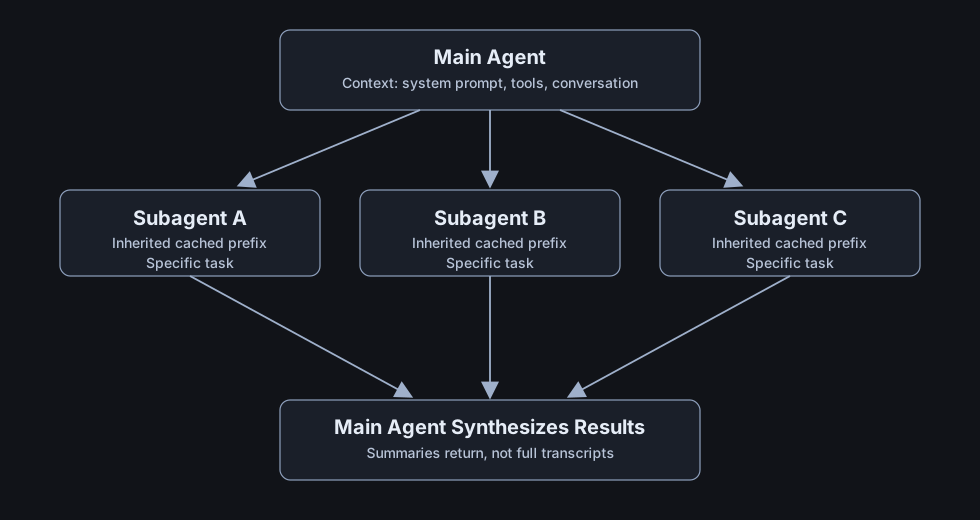
Each subagent gets a fresh context window (200K tokens for Claude), meaning it can do substantial work without affecting the main conversation’s context budget. When it finishes, it returns a summary, not the full transcript, to the parent. The main agent gets the signal without the noise.
Subagent Types and Specialisation
The leaked code reveals several distinct subagent types, each optimised for different tasks:
Explore subagent. Used for codebase navigation and research. Has read-only tools (Read, Glob, Grep, LS) but no write capabilities. Its job is to find and understand, not to modify.
Plan subagent. Used for designing implementation approaches. Reviews requirements, analyses constraints, and produces a structured plan. Operates in a planning-specific mode with different tool access.
Task subagent. The general-purpose worker. Can be given write access for implementation work. Returns a summary when complete.
Worktree subagent. Runs in an isolated git worktree, allowing parallel modifications to the codebase without conflicts. Used for exploratory changes that might be discarded.
The key pattern is that each subagent type has its own tool permissions and system prompt additions. The Explore subagent cannot write files; the Task subagent cannot deploy. This is defence in depth - a compromised or confused subagent is limited by its type.
Marketing Application: Parallel Platform Analysis
For marketing agents, the subagent model solves a common workflow: “How are we performing across all platforms?”
Without subagents, the agent would need to:
- Query GA4
- Wait for response
- Query Meta Ads
- Wait for response
- Query Google Ads
- Wait for response
- Synthesise results
With subagents:
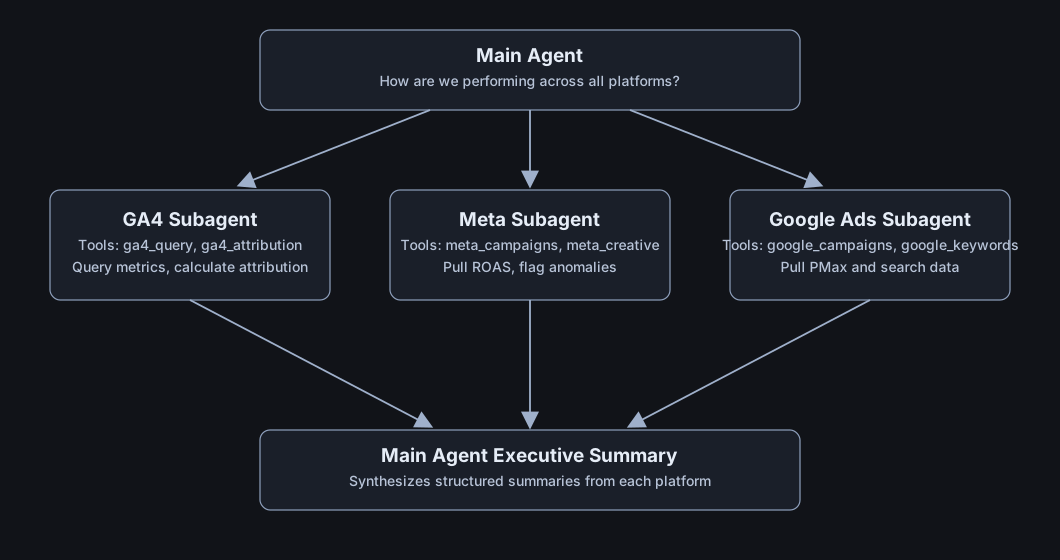
The parallel execution saves time, but the greater benefit is context isolation. Each platform subagent can load platform-specific knowledge without bloating the main conversation. The Meta subagent loads memory/meta-campaigns.md; the GA4 subagent loads memory/ga4-patterns.md. When they return, only the conclusions enter the main context, not the platform-specific detail.
SKILL.md pattern for platform subagents:
---
name: parallel-platform-analysis
description: >
  Spawn platform-specific subagents to gather metrics in parallel,
  then synthesise into executive summary. Use when user asks for
  cross-platform performance review.
---

# Parallel Platform Analysis

## When to use
Use when the user asks for performance across multiple platforms,
or for a weekly/monthly performance review.

## Workflow

### 1. Spawn platform subagents in parallel
Create three subagents simultaneously:

- **GA4 Analyst**: Query sessions, conversions, attribution
- **Meta Specialist**: Pull campaign ROAS, creative performance, audience metrics
- **Google Ads Analyst**: Pull search and Performance Max metrics

Each subagent should:
- Load its platform-specific memory file
- Query the last 7 and 30 day periods
- Calculate key metrics (CTR, CPC, CPA, ROAS)
- Flag anomalies against historical baselines
- Return a structured JSON summary

### 2. Wait for all subagents
Do not proceed until all three have returned.

### 3. Synthesise
Combine the three summaries into a unified executive report:
- Overall performance (blended ROAS, total spend, total conversions)
- Platform comparison (which platform is driving efficiency?)
- Anomalies requiring attention
- Recommended actions (prioritised)

## Output format
Markdown with:
- Executive summary (3-5 sentences)
- Platform metrics table
- Key insights (3-5 bullets)
- Recommended actions (prioritised list)
Part IV: The Permission Architecture
Five Permission Modes
The leaked source confirms a five-level permission system that practitioners can adapt for marketing contexts:
Normal mode (default). Every potentially dangerous operation requires explicit approval. The agent asks before writing files, running commands, or making network calls. This is the safest mode but creates friction for routine tasks.
Auto-accept edits mode. File edits proceed without prompts; shell commands still require approval. Useful when the agent is making many small changes and you trust its judgment on file modifications.
Plan mode. Read-only. The agent can explore, analyse, and plan, but cannot modify anything. Useful for initial exploration of a codebase (or campaign structure) before committing to changes.
Don’t-ask mode. All tool usage is denied unless explicitly pre-approved via settings. Nothing runs automatically; everything requires prior configuration. Useful for automation pipelines where you want a fixed, explicit tool surface.
Bypass-permissions mode. Everything is auto-approved. Use only in fully isolated environments. Even in this mode, deny rules still apply - certain operations can be blocked regardless of mode.
The modes form a spectrum from maximum safety (plan) to maximum autonomy (bypass). Most production usage sits in the middle: auto-accept edits for trusted file operations, explicit approval for shell commands and network calls.
Declarative Permission Rules
Beyond modes, Claude Code supports declarative rules that specify exactly what is allowed, denied, or requires asking:
{
  "permissions": {
    "allow": [
      "Read",
      "Bash(npm run *)",
      "Bash(git log *)",
      "Bash(git diff *)",
      "WebFetch(domain:docs.anthropic.com)"
    ],
    "deny": [
      "Bash(rm -rf *)",
      "Bash(git push --force *)",
      "Bash(sudo *)",
      "WebFetch(domain:internal.company.com)"
    ],
    "ask": [
      "Bash(git push *)",
      "Bash(npm publish *)"
    ]
  }
}
Rules evaluate in order: deny first, then ask, then allow. The first matching rule wins. This means deny rules are absolute - they cannot be overridden by allow rules.
The patterns use glob syntax. Bash(npm run *) matches any npm run command. WebFetch(domain:*.company.com) matches any subdomain of company.com. This allows precise specification of permitted operations.
Settings scopes: Claude Code supports multiple settings layers that merge with increasing priority:
- User global (
~/.claude/settings.json) - Project shared (
.claude/settings.json, committed to git) - Project local (
.claude/settings.local.json, gitignored) - Managed/enterprise (system paths)
Arrays merge across layers. A project deny rule combines with user allow rules, with deny taking precedence.
Marketing Application: Risk-Tiered Campaign Control
For marketing agents, the permission system maps to operational risk:
Tier 0: Read-only (any agent, any time)
{
  "allow": [
    "Read",
    "ga4:query_metrics",
    "meta:list_campaigns",
    "google_ads:get_performance"
  ]
}
Query metrics, list campaigns, read historical data. No risk of modification.
Tier 1: Reporting (analyst agents)
{
  "allow": [
    "Write(reports/*.md)",
    "slack:post_message(channel:#marketing-reports)",
    "email:send(to:internal-team@company.com)"
  ]
}
Create reports, send to internal channels. Cannot modify campaigns.
Tier 2: Draft modifications (campaign manager agents)
{
  "allow": [
    "meta:create_draft_campaign",
    "google_ads:create_draft_campaign"
  ],
  "deny": [
    "meta:publish_campaign",
    "google_ads:activate_campaign"
  ]
}
Create drafts for human review. Cannot publish.
Tier 3: Limited live changes (optimiser agents)
{
  "allow": [
    "meta:adjust_bid(max_change:10%)",
    "meta:adjust_budget(max_change:$100)",
    "meta:pause_campaign(cpa_threshold:$200)"
  ],
  "ask": [
    "meta:adjust_budget(max_change:>$100)"
  ],
  "deny": [
    "meta:create_campaign",
    "meta:delete_campaign"
  ]
}
Make bounded optimisations. Large changes require approval. Cannot create or delete.
Tier 4: Full control (requires human approval per action)
{
  "defaultMode": "ask",
  "allow": [
    "Read"
  ]
}
Every modification requires explicit approval. Used for new campaigns, major budget changes, or unfamiliar scenarios.
The key insight from Claude Code’s architecture: permissions are not just about blocking bad things. They are about creating appropriate autonomy for appropriate contexts. An optimiser agent operating at 2 AM should have Tier 3 permissions - enough autonomy to respond to anomalies, bounded enough that mistakes are recoverable.
Part V: The Tool Ecosystem
The Default Tool Set
The leaked source shows Claude Code starts with fewer than 20 default tools, with 40+ more available when needed:
Always-on tools:
- AgentTool (spawn subagents)
- BashTool (shell commands)
- FileReadTool (read files)
- FileEditTool (surgical edits)
- FileWriteTool (create/overwrite files)
- GlobTool (file pattern matching)
- GrepTool (content search)
- NotebookEditTool (Jupyter notebooks)
- WebFetchTool (fetch web content)
- WebSearchTool (search the web)
- SkillTool (invoke skills)
- AskUserQuestionTool (prompt for input)
- TodoWriteTool (task tracking)
- SendMessageTool (communication)
Mode-specific tools:
- EnterPlanModeTool / ExitPlanModeTool
- BriefTool (concise responses for background mode)
MCP tools:
- ListMcpResourcesTool
- ReadMcpResourceTool
- MCPTool (invoke MCP server tools)
The minimal default set is deliberate. Each tool in context costs tokens. Loading 60 tools when you only need 10 wastes context budget. The architecture assumes tools load on demand: the SkillTool invokes a skill that might use additional tools; the MCPTool bridges to external servers with their own tool sets.
Tool Result Sampling and Deduplication
Two patterns in the leaked code address context efficiency:
File read deduplication. When multiple subagents need to read the same file, it is read once and shared. The harness tracks which files have been read in the current session and serves cached content for subsequent requests.
Tool result sampling. When tool outputs are large (a search returning 500 results, a file listing with thousands of entries), the harness samples the results to include only the most relevant portions. The sampling logic considers: recency (recent items first), relevance (items matching the query most closely), and diversity (avoid redundant entries).
These patterns address the context entropy problem. Without sampling, a few large tool calls can exhaust the context window. With sampling, the agent gets the signal it needs without the noise.
Marketing Application: API Efficiency Patterns
For marketing agents, the same principles apply:
Load tools on demand:
# SKILL.md pattern

## Tools required
This skill needs:
- ga4:query_metrics (for session and conversion data)
- ga4:attribution (for attribution analysis)

Do not load Meta or Google Ads tools unless the task specifically requires cross-platform comparison.
Sample large results:
# When querying campaign metrics, sample the response
def sample_campaign_metrics(campaigns, max_items=20):
    # Sort by spend (most significant campaigns first)
    sorted_campaigns = sorted(campaigns, key=lambda c: c['spend'], reverse=True)

    # Take top campaigns by spend
    top_by_spend = sorted_campaigns[:max_items // 2]

    # Also include any with anomalies regardless of spend
    anomalies = [c for c in campaigns if c['cpa_change'] > 0.2][:max_items // 4]

    # Deduplicate
    sampled = list({c['id']: c for c in (top_by_spend + anomalies)}.values())

    return sampled[:max_items]
Cache shared queries:
# If multiple subagents need the same base data, query once
class QueryCache:
    def __init__(self, ttl_seconds=300):
        self.cache = {}
        self.ttl = ttl_seconds

    def get_or_query(self, cache_key, query_fn):
        if cache_key in self.cache:
            cached_at, data = self.cache[cache_key]
            if time.time() - cached_at < self.ttl:
                return data

        data = query_fn()
        self.cache[cache_key] = (time.time(), data)
        return data

# Usage
metrics_cache = QueryCache()
ga4_data = metrics_cache.get_or_query(
    f"ga4:{account_id}:{date_range}",
    lambda: ga4_client.query_metrics(account_id, date_range)
)
Part VI: Unreleased Patterns
The leaked source contains 44 feature flags gating capabilities that Anthropic has built but not shipped. Two patterns are particularly relevant for marketing applications.
KAIROS: The Background Daemon
KAIROS (the Greek concept of “the right time”) is referenced over 150 times in the leaked source. It represents a fundamental shift: from reactive agent (waits for user input) to proactive agent (monitors and acts on its own schedule).
How KAIROS works:
The agent runs as a persistent background process. On a regular interval, it receives <tick> prompts that let it decide whether to act proactively or stay quiet (very much reminds of OpenClaw Heartbeat). It maintains append-only daily log files of observations, decisions, and actions. When KAIROS decides to act, it uses a special “Brief” output mode - extremely concise responses designed for a persistent assistant that should not flood the terminal.
Key constraints:
- 15-second blocking budget: any proactive action that would block the user’s workflow for more than 15 seconds gets deferred
- The agent can be helpful without being annoying
- Background sessions are separate from interactive sessions
Integration with Auto Dream:
KAIROS enables Auto Dream to run proactively. Instead of waiting for session end, the agent can consolidate memory during idle periods - merging observations, removing contradictions, converting tentative notes into confirmed facts.
ULTRAPLAN: Cloud-Offloaded Planning
For complex tasks that exceed what can be reasoned through in a normal turn, ULTRAPLAN offloads planning to a cloud container running a more capable model (Opus 4.6 in the leaked config) for up to 30 minutes.
How ULTRAPLAN works:
The user requests a complex task (“Plan the Q3 campaign architecture across 15 markets”). Instead of attempting to plan inline, the agent launches a Cloud Container Runtime session. The planning agent works in the cloud, with more compute budget and no token pressure. When done, it produces a detailed plan that the user can review in a browser interface before approving. A special sentinel value (__ULTRAPLAN_TELEPORT_LOCAL__) signals the result should be “teleported” back to the local terminal.
This pattern recognises that some tasks are inherently long-horizon. Trying to force them into a single turn produces shallow results. Offloading to a dedicated planning session produces deeper, more coherent plans.
Marketing Application: Always-On Monitoring
KAIROS maps directly to marketing monitoring needs:
Continuous anomaly detection:
# kairos-marketing-monitor/SKILL.md

## Tick behaviour (runs every 15 minutes)

### 1. Orient
Check memory for known baseline metrics and alert thresholds.

### 2. Gather
Query each platform for key metrics:
- GA4: sessions, conversions, bounce rate
- Meta: spend pacing, CPA, ROAS
- Google Ads: click share, CPA, Quality Score changes

### 3. Detect
Compare current values against baselines:
- CPA increase > 20% from baseline → anomaly
- ROAS decrease > 15% from baseline → anomaly
- Spend pacing > 110% of expected → overspend alert
- Conversion rate drop > 25% → possible tracking issue

### 4. Act (Brief mode)
For detected anomalies:
- Log to daily anomaly file
- Send Slack alert to #marketing-alerts
- If severity is critical and hour is business hours, ping on-call

Do NOT:
- Take corrective action automatically (Tier 4+ actions require human approval)
- Spam repeated alerts for the same anomaly (dedupe by issue ID)
- Alert on expected variations (weekend patterns, known seasonal effects)
ULTRAPLAN for quarterly planning:
# ultraplan-quarterly-strategy/SKILL.md

## When to use
Use for quarterly budget allocation, market expansion planning,
or other strategic decisions requiring >10 minutes of analysis.

## Workflow

### 1. Initiate ULTRAPLAN
Request cloud planning session with:
- Full historical performance data (last 4 quarters)
- Market growth projections
- Competitive intelligence
- Budget constraints and ROAS targets

### 2. Planning session (up to 30 minutes)
The planning agent will:
- Analyse performance trends by market and channel
- Model budget allocation scenarios
- Project expected outcomes under different strategies
- Identify risks and dependencies
- Produce detailed quarterly plan

### 3. Human review
Present plan in structured format for approval:
- Executive summary
- Budget allocation table
- Channel strategy per market
- Risk mitigation approach
- Key milestones and checkpoints

### 4. Materialise
Upon approval, write plan to:
- memory/q3-2026-plan.md (reference)
- outputs/Q3-2026-Marketing-Plan.md (shareable document)
Part VII: Context Management
Context Compaction Strategies
The leaked source reveals sophisticated context management. When the context window fills up, Claude Code does not simply truncate - it compacts.
Five compaction strategies (identified in the source):
-
Summary compaction. Generate a structured summary of the conversation so far, preserving key identifiers, decisions, and state.
-
Tool result trimming. Large tool outputs are summarised; only the most relevant portions are retained.
-
Message dropping. Older messages that are fully summarised can be removed from active context.
-
File content eviction. File contents that have been read and processed can be evicted, with a note that they can be re-read if needed.
-
Metadata compression. Redundant context (repeated system instructions, duplicate tool definitions) is deduplicated.
The compaction is not just about staying under the token limit. It is about preserving the most useful context while removing noise. The compacted context should allow the agent to continue working as if nothing was lost.
Session memory enables instant compaction:
A key innovation in recent Claude Code versions: session memory is written continuously in the background. When compaction is needed, the session summary is already available - no need to stop and generate it. Compaction becomes instant: swap out the detailed history for the pre-written summary.
Session Memory and Instant Recovery
Session memory extends beyond a single session. The agent maintains summaries that include:
- Session title (auto-generated description of the work)
- Current status (completed items, open questions)
- Key identifiers (IDs, paths, URLs referenced)
- Decisions made and rationale
- Next steps
When a new session starts, relevant past session summaries are injected into context with a note: “from PAST sessions that might not be related to the current task.” The agent uses them as background knowledge, not active instructions.
Session memory trigger conditions:
- First extraction: after ~10,000 tokens of conversation
- Subsequent updates: every ~5,000 tokens or after every 3 tool calls
- Short sessions produce minimal summaries; deep sessions produce detailed ones
Marketing Application: Long-Running Campaign Sessions
Marketing work spans sessions. A campaign optimisation might involve:
Session 1: Initial audit - pull all campaign data, identify underperformers, draft recommendations.
Session 2 (next day): Review recommendations with stakeholder, refine approach, begin implementation.
Session 3 (three days later): Check performance impact of changes, adjust based on results.
Without session memory, each session starts from scratch. With session memory:
# Session memory: marketing-campaign-optimisation/2026-04-01

## Session title
Q2 Campaign Optimisation - Initial Audit

## Current status
- Completed: Full audit of 47 campaigns across Meta and Google Ads
- Completed: Identified 12 underperformers (CPA > $150, ROAS < 1.5)
- In progress: Drafting budget reallocation recommendations

## Key identifiers
- Meta account: act_12345678
- Underperformers: campaigns [C001, C004, C007, C012, C018, C023, C029, C033, C038, C041, C045, C047]
- High performers for budget increase: [C002, C009, C015, C022]

## Decisions made
- Threshold for underperformance: CPA > $150 OR ROAS < 1.5
- Minimum 14-day data window for decisions (avoid reacting to short-term variance)
- Budget reallocation strategy: gradual (10% shifts per week)

## Next steps
1. Present underperformer analysis to [stakeholder]
2. Get approval for proposed reallocations
3. Implement first round of changes (targeting Tuesday for low-traffic implementation)
When session 2 starts, the agent loads this summary and can immediately continue: “I see we identified 12 underperformers yesterday. Would you like to review the proposed reallocations before I begin implementation?”
Part VIII: Implementation Patterns
Translating Patterns to Your Stack
The Claude Code patterns are not Claude-specific. They encode general solutions to problems that every agent harness faces. Here is how to translate them to your environment:
Memory architecture → any persistent storage:
The three-layer design works with:
- Files in a project directory (simplest)
- Git-versioned markdown in a dedicated repo (team-shareable)
- A lightweight database with full-text search (for larger scale)
- A vector store with semantic retrieval (for dense knowledge bases)
The key is the structure: lightweight index always in context, detailed knowledge loaded on demand, full history searchable but never bulk-loaded.
Subagents → any multi-turn orchestration:
If your agent framework supports multiple context windows, use them. If not, simulate with:
- Sequential calls with separate system prompts
- Separate API sessions with shared cache keys
- Background workers with message-passing
The key is context isolation: subagents should not bloat the main conversation.
Permissions → your orchestration layer:
Declarative permissions belong in your agent’s configuration, not in the model prompt. The orchestration layer checks permissions before tool execution. This separates policy from behaviour.
Tool sampling → your tool implementations:
Make your tools return structured, sampled results by default. A campaign metrics tool should return the top N campaigns with the most significant changes, not all 500 campaigns.
Background processing → cron/scheduler + agent:
KAIROS-style behaviour does not require Anthropic infrastructure. Run your agent on a cron job with a monitoring prompt. The pattern is: query → compare to baselines → act if needed → log.
Reference Architecture for Marketing Harnesses
Here is a concrete directory structure for a marketing agent harness that implements the patterns from the leak:
marketing-agent/
├── AGENTS.md                           # Operating instructions (Claude Code/Codex style)
├── AGENTS-SECURITY.md                  # Security policies and permissions
├── .mcp.json                           # MCP server configuration
│
├── memory/
│   ├── MEMORY.md                       # Index (always loaded, <200 lines)
│   ├── ga4-patterns.md                 # GA4 knowledge
│   ├── meta-campaigns.md               # Meta knowledge
│   ├── google-ads.md                   # Google Ads knowledge
│   ├── creative-learnings.md           # Creative performance patterns
│   └── reporting-preferences.md        # Output formatting preferences
│
├── skills/
│   ├── weekly-performance-review/
│   │   └── SKILL.md
│   ├── parallel-platform-analysis/
│   │   └── SKILL.md
│   ├── anomaly-detection/
│   │   └── SKILL.md
│   ├── campaign-optimiser/
│   │   └── SKILL.md
│   └── quarterly-planner/
│       └── SKILL.md
│
├── tools/
│   ├── ga4/
│   │   ├── query_metrics.py
│   │   └── attribution.py
│   ├── meta/
│   │   ├── list_campaigns.py
│   │   ├── get_metrics.py
│   │   └── adjust_budget.py
│   └── google_ads/
│       ├── list_campaigns.py
│       └── get_performance.py
│
├── logs/
│   ├── sessions/                       # Session transcripts (JSONL)
│   ├── anomalies/                      # Detected anomalies log
│   └── actions/                        # Audit log of all tool actions
│
├── config/
│   ├── settings.json                   # Agent settings (model, permissions)
│   ├── thresholds.yaml                 # Anomaly detection thresholds
│   └── baselines.yaml                  # Performance baselines by platform
│
└── scripts/
    ├── kairos-tick.sh                  # Background monitoring trigger
    ├── dream-consolidate.py            # Memory consolidation
    └── session-export.py               # Export session summaries
AGENTS.md (operating instructions):
# Marketing Agent Operating Instructions

## Core principles
- Never fabricate metrics. If an API fails, say so.
- Always cite data sources and date ranges.
- Flag uncertainty explicitly.

## Mandatory skills
- Before any cross-platform analysis: call `parallel-platform-analysis`
- Before any campaign modification: call `campaign-optimiser` with dry_run=true first
- After any optimisation action: log to logs/actions/

## Permissions
- Tier 0-1 actions: proceed automatically
- Tier 2 actions: require confirmation
- Tier 3 actions: require explicit user approval per action
- Tier 4 actions: disabled in automation mode

## Memory protocol
- Check memory/MEMORY.md at session start
- Load relevant topic files for the current task
- If information seems outdated, search session logs before trusting memory
Implementation Path
If you are adapting these harness patterns into a real marketing agent, sequence the work in the same order Claude Code’s architecture suggests:
-
Build the memory layer first. Start with
MEMORY.md, a few topic files, and searchable session logs. Without this, every session resets to zero. -
Add constrained tools before adding autonomy. Expose read-only analytics and reporting tools first. Delay campaign-changing actions until permissions and audit logging exist.
-
Introduce subagents only where parallelism is valuable. Cross-platform analysis, anomaly triage, and asset QA benefit from parallel workers. Simple workflows do not.
-
Move permissions into the harness, not the skill text. The model can propose actions, but the orchestration layer should decide what can execute automatically, what needs approval, and what is blocked.
-
Add background monitoring only after the foreground path is stable. KAIROS-style always-on monitoring is useful, but only when your thresholds, logging, and escalation paths are already reliable.
This keeps the build practical: memory first, then tools, then control, then scale.
Further Reading
- Diving into Claude Code’s Source Code Leak - Engineer’s Codex
- Inside Claude Code’s leaked source: swarms, daemons, and 44 features Anthropic kept behind flags - The New Stack
- The Claude Code Leak - Build.ms
- Claw Decode - timeline, feature catalog, and architecture notes
Conclusion: From Leak to Learning
The Claude Code source leak is, in the security sense, a minor incident. No customer data escaped. No model weights were exposed. The harness code is substantial intellectual property, but it is also, now,public knowledge.
For practitioners building marketing agents, the leak is something more valuable: a detailed look at how a production-grade agent harness actually works. The actual code, with all its complexity, edge cases, and hard-won design decisions.
The patterns we have extracted - three-layer memory, fork-join subagents, declarative permissions, tool sampling, background monitoring, context compaction - are not Anthropic secrets. They are emerging best practices for any serious agent harness. Anthropic happened to implement them in a way that leaked. We happen to have the opportunity to learn from that implementation.
The marketing-specific applications throughout this guide are not hypothetical. They are direct translations of patterns that work at scale in the coding domain. Campaign knowledge persists the same way codebase knowledge persists. Platform subagents parallelize the same way code exploration subagents parallelize. Permission tiers control campaign modifications the same way they control file writes.
What to do with this:
Start with memory. If your marketing agent does not have persistent memory across sessions, implement the three-layer design. Write an index file. Create topic files for your major platforms. Add session logging.
Add subagents when you need parallelism. If you are querying multiple platforms, spawn parallel subagents. Context isolation is worth the implementation complexity.
Define permissions explicitly. Write down what your agent can do automatically, what requires confirmation, and what requires explicit approval. Make this a configuration file, not scattered logic.
Build toward background monitoring. Even without KAIROS infrastructure, you can run an agent on a cron job. Continuous anomaly detection is more valuable than you expect until you have it.
The harness is the product. The model provides capability. The harness provides reliability, safety, and domain fit. A well-harnessed agent on a smaller model will outperform a raw agent on a frontier model for sustained production work.
Anthropic spent two years and significant engineering resources building Claude Code. The leak gives us a shortcut to their conclusions. Use it.
This guide is part of the Performics Labs AI Knowledge Hub series on agentic marketing systems. Previous guides: Building AI Skills · Agent Architecture · Tools, MCP, and CLI · Your OpenClaw Marketing Agent · Maintenance and Security Harness · Portable Plugins
Implementation examples and skill templates are available in the companion repository at github.com/ai-knowledge-hub/ai-skills-guide.